Top height
Top height sets the height that describes the top of the cut. Top height should be set above the Bottom. Use Offset to shift the height from the reference selected in From. A positive or negative offset moves the height in either direction.
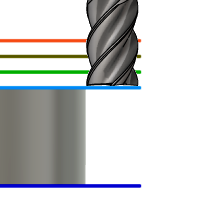
Top height.
From
- Clearance height - Incremental offset from the Clearance Height.
- Retract height - Incremental offset from the Retract Height.
- Feed height - Incremental offset from the Feed Height.
- Bottom height - Incremental offset from the Bottom Height.
- Model top - Incremental offset from the Model Top.
- Model bottom - Incremental offset from the Model Bottom.
- Stock top - Incremental offset from the Stock Top.
- Stock bottom - Incremental offset from the Stock Bottom.
- Selection - Incremental offset from a Point (vertex), Edge, or Face selected on the model.
- Origin (absolute) - Absolute offset from the Origin that is defined in either the Setup or in Tool Orientation within the specific operation.
Drill only:
- Hole top - Incremental offset from the Hole Top.
- Hole bottom - Incremental offset from the Hole Bottom.
- Hole segment top - Incremental offset from the top of the selected hole segment.
- Hole segment bottom - Incremental offset from the bottom of the selected hole segment.