Machine groove undercuts
On the Manufacture workspace toolbar, click Turning > Turning > Turning Profile Roughing.
The Profile Roughing dialog opens.
On the Tool tab, click Select to pick a tool. To machine undercuts, you must select a non-grooving tool.
Tip: A right handed tool is the most common selection for this toolpath.In the Insert & Holder group, from the Clearance from drop-down menu, choose an option to specify where the clearance between the tool and the model is measured from.
Specify a Clearance value.
On the Passes tab, in the Passes group, select Machine Undercuts.
Program the rest of the operation and then click OK.
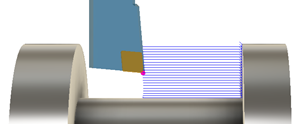
Machining undercuts