View design history and related data
If you're using Fusion for education, this feature will work differently for you. Scroll down to View design history and related data (Fusion for education) to find out how.
View history
To view the history of a design, use one of these methods:
Data Panel
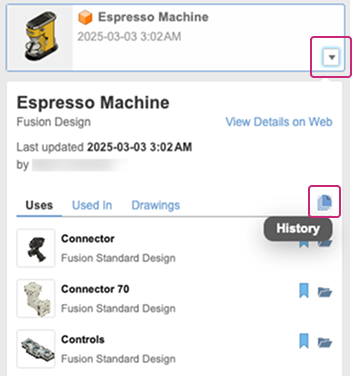
In the Data Panel, locate the design you want to view.
Click the arrow
 next to the design to expand more details.
Click the History button
 .
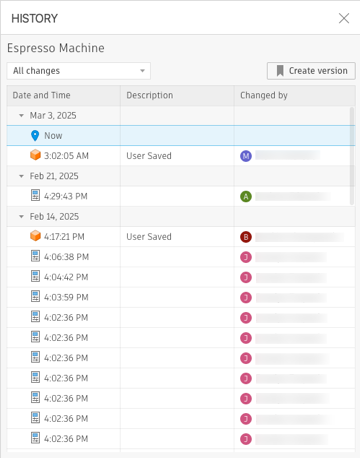
.The History dialog opens, displaying model saves, versions, revisions, property edits, and more.
Browser
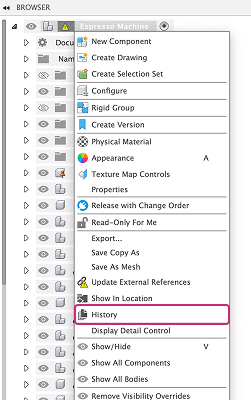
In the Browser, right-click the top-level, internal, or external component whose history you'd like to view.
Select History from the list.
The History dialog opens, displaying model saves, versions, revisions, property edits, and more.
View external components in a design
In the Data Panel, navigate to the design you want to view.
Click the arrow
next to the design to expand more details.Click the Uses tab.
All external components used by this design display in a list under the Uses tab.
View designs that include the design as a component
In the Data Panel, navigate to the design you want to view.
Click the arrow
next to the design to expand more details.Click the Usesd In tab.
All design documents that use this design as an external component display in a list under the Used In tab.
View drawings that reference a design
In the Data Panel, navigate to the design you want to view.
Click the arrow
next to the design to expand more details.Click the Drawings tab.
All drawings that reference this design display in a list under the Drawings tab.
Tips
- In the History dialog, you can open a historical change of the design. Hover over a change to reveal the More menu
 . Click it to expand the menu and select Open to view those changes in a separate document tab.
 - In the Data Panel, you can open a design listed under the Uses, Used In, or Drawings tabs. Click Open
 to open the design in a separate document tab.
View design history and related data (Fusion for education)
View the version history and related data of a design in Fusion for education.
View all versions of a design
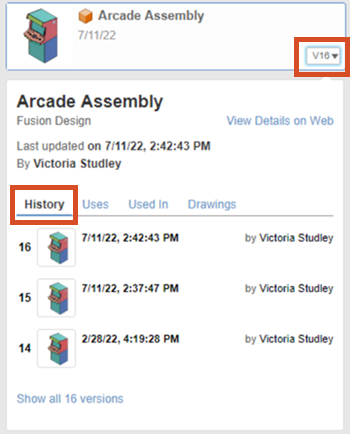
In the Fusion Data Panel, navigate to the design.
Click the Version Number.
The design details expand.
On the History tab, the first 3 versions display in order from newest to oldest.
On the History tab, click Show All # Versions.
The design history expands to display the remaining versions.
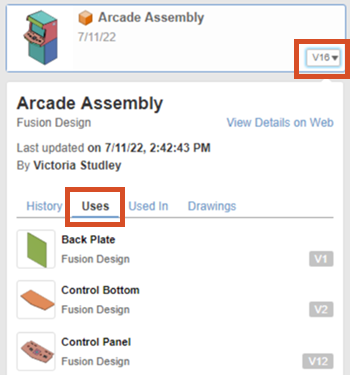
View external components referenced in a design
Expand the design details.
Click the Uses tab.
All of the design documents inserted as external components display in a list.
View other designs that reference a design as an external component
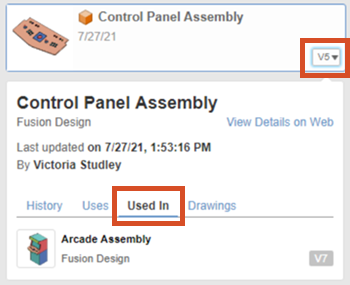
Expand the design details.
Click the Used In tab.
All of the design documents where the design is inserted as an external component display in a list.
View drawings that reference a design
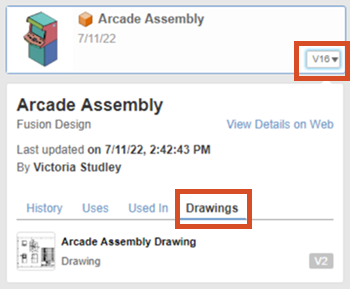
Expand the design details.
Click the Drawings tab.
All of the drawing documents that reference the design display in a list.
Tips
- On the History tab, expand the More menu on any version to Open
 it, create a Milestone
  version from it, or Copy
  it.
it. - On the Uses or Used In tabs, hover over any design and click Open to open it in a separate document tab.
- On the Drawing tab, hover over any drawing and click Open to open it in a separate document tab.