Work with versions in the History dialog
If you're using Fusion for education, this feature will work differently for you. Scroll down to Work with milestones and versions in History (Fusion for education) to find out how.
Fusion tracks iterations as versions and changes. Use the History dialog to access them.
Open the History dialog in Fusion
- Right-click the component in the Browser.
- In the context menu that opens, select History
 .
.
Work with versions and changes in the History dialog
(Optional) In the History dialog, select which types of changes you want to see.
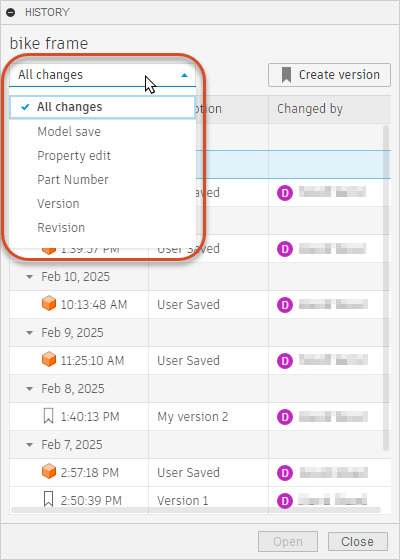
Place the pointer over the timestamp that corresponds to the change or version you want to open.
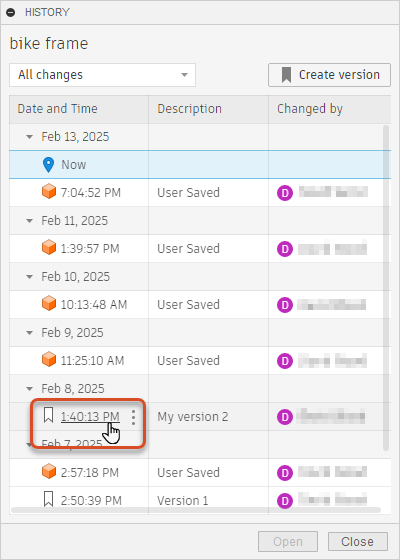
Click the timestamp to open that version or change.
Work with milestones and versions in History (Fusion for education)
Fusion for education tracks iterations as milestones and versions. Use the history dialog to access versions and create and manage milestones.
Open the History dialog in Fusion
- Right-click the component in the Browser.
- Select History in the context menu that opens.
The component History dialog displays.
Open the History dialog in the Fusion web client
In the Fusion web client, navigate to the Overview tab on the design details page.
Click the version control drop-down.

Work with versions and milestones in the History dialog
The History dialog contains a list of versions and milestones of a component.
Select a version you want to work with.
In the upper right corner of the dialog, click More
 .
.Select an option to create, edit, or navigate to a milestone.
Fusion options include:
 Go to: Takes you to the details page of that version of the design.
 Create Milestone: Makes this version a milestone.
 Edit Milestone: Allows you to edit a milestone that has already been created.
options include:
- Open: Opens that version of the design.
- Create Milestone: Makes this version a milestone.
- Edit Milestone: Allows you to edit a milestone that has already been created.