Change the lifecycle state of an affected item
Fusion Manage
Fusion Manage requires a separate license and can be used with Fusion or independently. Learn more.
Affected items are designs or drawings that are tracked by a change order. You change an item's lifecycle state on the Affected Items tab of the change order tracking the item. Once the change order is approved, the affected items move to the selected lifecycle state. A change order is required to release an item to Production and to revise an item that is in production.
In a change order, click the Affected Items tab.
Click Edit.
Click in the Lifecycle column for the item and then select the new lifecycle state.
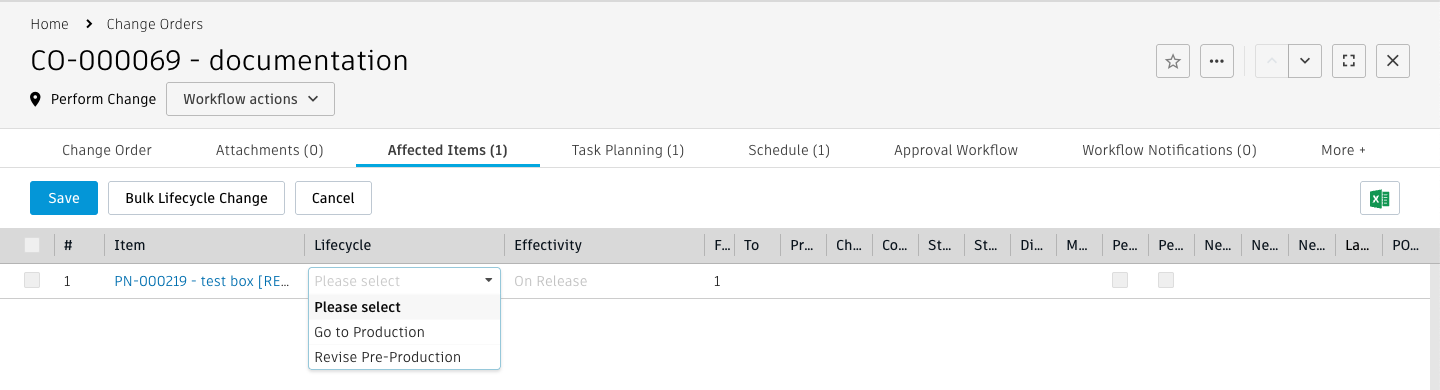
Click Save.
Change the lifecycle state of all affected items
- Click Bulk Lifecycle Change.
- On the Bulk Lifecycle Change page, select the lifecycle transition for each item.
- If you want to specify when the changes are effective, click Yes and then specify the effectivity date.
- Click Update.