Manage attachments
Fusion Manage
Fusion Manage requires a separate license and can be used with Fusion or independently. Learn more.
In addition to uploading and downloading attachments, you can:
- View the history of an attached file.
- Lock a file.
- Remove a file from the Attachments tab.
View the history of an attachment
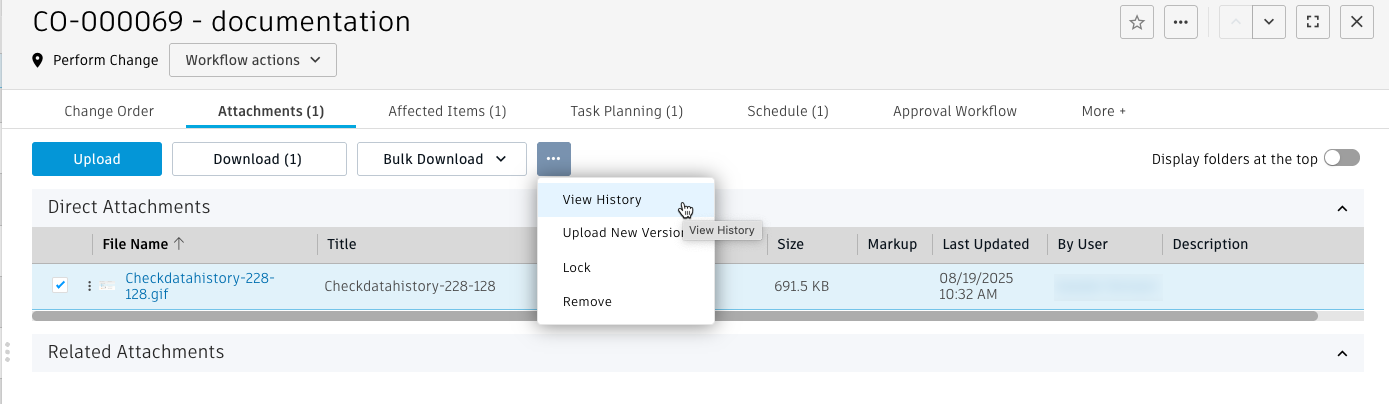
In the change order, click the Attachments tab.
Select an attachment.
From the Attachment menu (...), select View History.
For each version of the selected file, the History dialog shows:
version number
file name
markup
date uploaded
file owner
description
For any version, click Download
 to save that version of the file to your browser's download location.
Lock or unlock an attachment
If you lock an attachment, it and all its versions cannot be removed from a change order.
- In the change order, click the Attachments tab.
- Select the attachments you want to lock or unlock.
- From the Attachment menu (...), select Lock or Unlock.
Remove an attachment
- In the change order, click the Attachments tab.
- Select the attachments to remove.
- From the Attachment menu (...), select Remove.
- When prompted to confirm removing the files, click Remove.