For-Each and While loops
Loops are subgraph specializations that run their inner graph more than once. System Modeler has two loop types: For-Each and While. Both use the same Subgraph Input and Subgraph Output nodes as a standard subgraph, but add ports for iteration control.
For-Each
A For-Each loop runs its inner graph once for each item in a list. The list is provided through the Items input port on the loop node on the parent canvas. When all iterations are complete, the loop outputs a Loop Results list with one entry per completed iteration, in order.
Inside the loop, the Subgraph Input node exposes:
- Item: The current element from the Items list
- Index: The zero-based index of the current iteration
- LoopResults: The accumulated results from all previous iterations
The Subgraph Output node exposes:
- Loop Result: The value this iteration contributes to the Loop Results output
- Break: Set to
trueto stop iteration after this iteration completes
Example
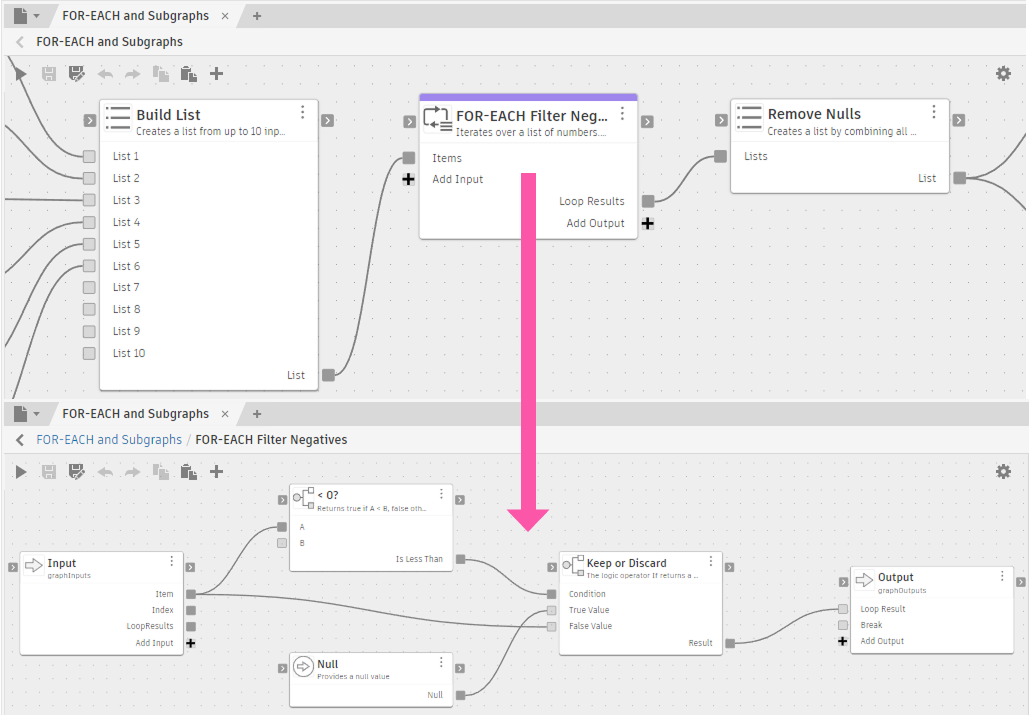
Base - FOR-EACH and Subgraphs
The loop receives a list of numbers and checks each one. Positive numbers are passed through as the Loop Result; negative numbers return Null instead. A Remove Nulls node in the parent graph cleans up the Null entries from the final output.
While
A While loop runs its inner graph repeatedly until the Break port on the Subgraph Output node is true, or until the iteration limit is reached. Unlike For-Each, While has no Items input. The number of iterations is determined by a condition computed inside the loop.
The loop node on the parent canvas exposes:
- Max Iterations (input, optional): The maximum number of iterations before the loop stops automatically. Defaults to 10,000 if not connected.
- Loop Results (output): The accumulated list of Loop Result values from all completed iterations.
Inside the loop, the Subgraph Input node exposes Index and LoopResults (same as For-Each, without Item). The Subgraph Output node exposes Loop Result and Break.
If the loop reaches Max Iterations without Break becoming true, Fusion stops the loop and emits a warning in the Diagnostics panel. The Loop Results accumulated up to that point are still returned.
Use While for workflows where the number of repetitions isn't known in advance. For example, use it to iterate until a value converges, or to retry an operation until it succeeds.
Example
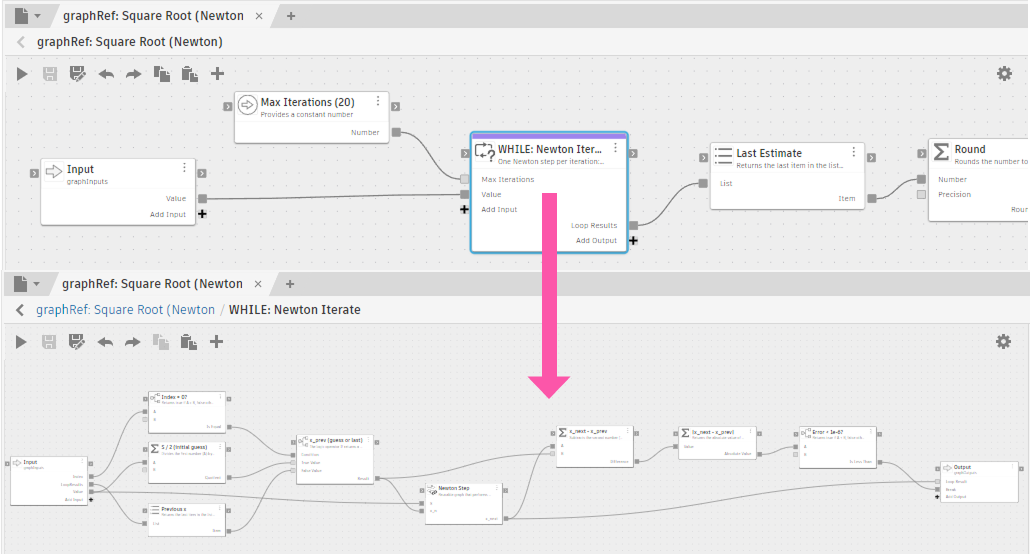
Base - Subgraph: Square Root (Newton)
The loop uses Newton's method to approximate a square root: each iteration computes a refined estimate, and the Break port is set to true when the error drops below 1e-6. If the error doesn't converge within 20 iterations, Max Iterations stops the loop. The Last Estimate node in the parent graph retrieves the final value from Loop Results.
Iteration behavior
Both loop types share the same iteration model:
- Each iteration runs in a fresh instance. Outputs from a previous iteration are accessible through the LoopResults accumulator, not through direct port connections.
- The LoopResults accumulator is the only value that carries forward. It grows by one entry each iteration, so inner nodes can read all previous results through the Subgraph Input node.
- Setting Break to
trueon the Subgraph Output node stops the loop after the current iteration. No further iterations run, and the Loop Results collected so far are the final output.
Nested For-Each loops and list-of-lists
When a For-Each loop runs inside the subgraph of another For-Each loop, each iteration of the outer loop produces a list as its Loop Result. The outer Loop Results output therefore accumulates a list of lists rather than a flat sequence of individual values.
Use a Flatten List node after the outer loop to collapse the nested structure into a single flat list before passing it to downstream nodes. See Lists for how Flatten List works.