Nodes
A node is a reusable functional unit. It performs a specific action (querying the model, transforming data, or applying an operation) and exposes ports that other nodes can wire into.
Each node has four parts:
- Inputs: Ports that receive data from upstream nodes or accept a value set directly on the node
- Outputs: Ports that pass results to downstream nodes
- Properties: Static configuration values set before the graph runs, used to customize how the node behaves
- Logic: The TypeScript code that transforms the node's inputs into outputs
Ports
Ports are the locations on a node where wires attach. Input ports appear on the left side of a node; output ports appear on the right side.
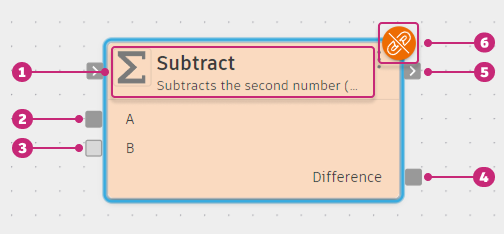
- Node title. Shows the node type icon, the node name, and a brief description.
- Required input port. Must have a wire connected before the graph can run.
- Optional input port. When no wire is connected, the node falls back to the corresponding property value set in the Details panel.
- Output port. Appears on the right side. Can connect to multiple downstream input ports.
- Flow port. Appears on the node edge, visually distinct from data ports. Enforces ordering without carrying a value.
- Diagnostic badge. Indicates a warning or error. Place the pointer over the badge to read the message, or open the Diagnostics tab in the Details panel.
Place the pointer over a port to see a tooltip showing its name and expected data type. Fusion enforces type compatibility: a wire can only connect an output port to an input port of a matching type. Incompatible ports are dimmed while you draw a wire, so only valid targets are highlighted.
Ports come in two varieties:
- Data ports: Carry a typed value between nodes. Most inputs and outputs are data ports.
- Flow ports: Enforce ordering between two nodes without carrying a value. They are rendered differently from data ports on the node edge.
Input ports can be required or optional. A required input port must have a wire connected before the graph can run. An optional input port falls back to the corresponding property value when no wire is connected.
An output port can connect to multiple input ports. The same value is shared by all consumers; you don't need to duplicate a node to use its output in more than one place.
Node properties
Properties are static configuration values set before the graph runs. They appear in the Details panel when you select a node. Some properties are also exposed as input ports, letting parent graphs or upstream nodes supply the value dynamically. Properties aren't ports: they aren't wired and don't appear on the node's port area.
To rename a node, select it, open the Node tab in the Details panel, and click the title box at the top to change its display name in the graph. Renaming only works in graphs that belong to an editable (user) package.
Node categories
Nodes are organized into categories within each package. Categories group nodes by what they operate on, for example Math, List, Logic, and Text in the Base package. See Node packages for the full list of available packages and their categories.
Lists
Lists are a core data type in System Modeler. A list is an ordered collection of values that travels along wires like any other value. In System Modeler, list types are shown with square brackets, for example number[] is a list of numbers. Developers familiar with arrays will recognize this notation; if you're new to programming, think of it as a sequence of values packaged together. See Lists.