Simulation Cache Entity Inspector
The Simulation Cache Entity Inspector is a tool showing the cached information of selected Simulation Cached Entities in Layout
LAUNCH
- Golaem Shelf:

- Golaem Render Menu: Entity Inspector
- Tool: Simulation Cache Layout Tool
- MEL command: glmEntityInspectorCmd();
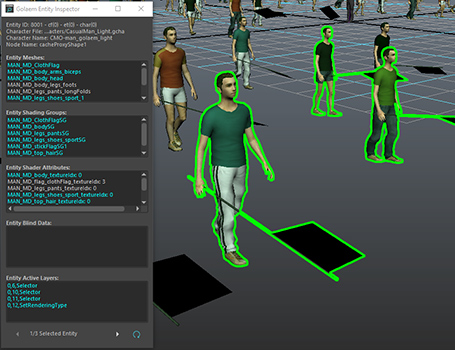
Notice that the bounding box used to perform the selection is the bounding box of the Perception Shape, which is defined in the Character Maker and can be overridden with any geometry in the Entity Type node Perception Attributes. To check what's the picking bounding box of the Entity, switch the Display Mode of the Entities to Bounding Box.
Simulation Cache Entity Inspector Overview
The Entity Inspector is divided in several panels. Items colored in blue are common to all the selected Entities:
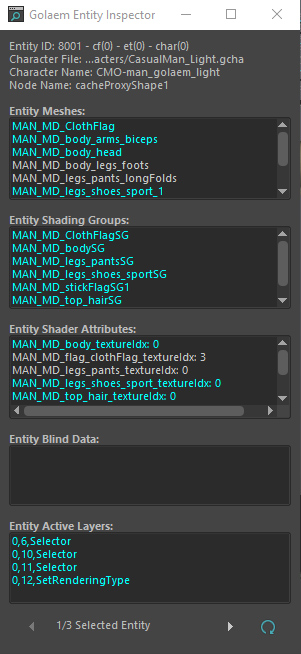
Entity Information
This panel contains the general information about the currently viewed Cached Entity: its unique ID, its Character File name, the name of its Character Node in the CharacterMaker Geometry tab , the name of the Simulation Cache Proxy it belongs to.
Entity Meshes
This panel contains the Mesh Assets assigned to the currently viewed Cached Entity with respect to the currently active Mesh Layers in the Layout Tool. A single click on a Mesh Asset in the Inspector will create a Selector Layer for the focused Cached Entity and a Mesh Layer ready to edit.
Entity Shading Groups
This panel contains the Shading Groups assigned to the currently viewed Cached Entity with respect to the currently active Shader Layers in the Layout Tool. A single click on a Shading Group in the Inspector will create a Selector Layer for the focused Cached Entity and a Shader Layer filled with the name of the Shader.
Entity Shader Attributes
This panel contains the Shader Attributes and their current values assigned to the currently viewed Cached Entity with respect to the currently active Shader Attribute Layers in the Layout Tool. A single click on a Shader Attribute in the Inspector will create a Selector Layer for the focused Cached Entity and a Shader Attribute Layer filled with the name of the Shader Attribute and the current value.
Entity Blind Data
This panel contains the Blind Data or Blend Shapes and their current values assigned to the currently viewed Cached Entity with respect to the currently active Blind Data Layers in the Layout Tool. A single click on a Blind Data in the Inspector will create a Selector Layer for the focused Cached Entity and a Blind Data Layer ready to edit.
Entity Active Layers
This panel contains the Layers of the Layout Files applied to the currently viewed Cached Entity. The first number mentions the id of the Layout File containing the Layer and the second is the ID of that Layer. A single click on a Layer in the Inspector will select the Layer in the Layout Tool; a double click will focus on the Layer.
Selection Information
This panel lets you change which selected Entity is viewed in the Entity Inspector and to refresh the values of the panel if required.
Layer Creation
When double clicking on an item of the Entity Inspector, it creates corresponding edition Layers in the Simulation Cache Layout Tool (see details above)