Entity Selector
The Entity Selector node lets you set the entities that are affected in the layout execution flow.
Add node
- In Maya Vertex Mode (F9), select one or more Entities in the
Simulation Cache Proxy, then double click on the Selector icon
 from the Nodes Library panel. This will create a Selector node
with the correct entity selection.
from the Nodes Library panel. This will create a Selector node
with the correct entity selection. - Drag the Selector icon from
the Nodes Library panel and drop it in
the Layout Graph Edition panel
- Hit the Tab key in the Layout Graph Edition panel and select the EntitySelector option in the dropdown menu that appears
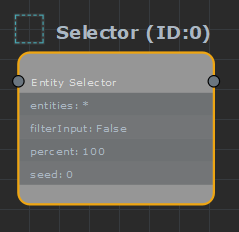
Entity Selector node in the Layout Graph Edition panel
Note that if entities are selected in the Simulation Cache Proxy while creating an Entity Selector node, it will automatically be configured to the current selection.
Node parameters
Parameters are accessible by selecting the node in the Layout Graph Edition panel:
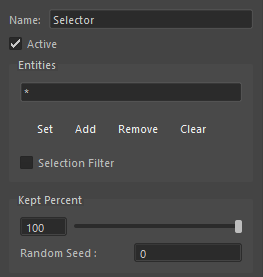
Entity Selector node parameters
| Name | Name of the node |
| Active | Whether the node is active or not |
| Entities | Expression to select entities. The expression can be:
You can nest expressions in d(), such as d(1001-3001) or d(i(14)), or even d(d(1001)) to get all duplicates of duplicates of 1001. Enclosing parenthesis must be used anywhere where priorities must be handled. '&' only handles 2 arguments, a&b&c will be an error, but a&(b&c) is OK. The buttons lets you edit the selection based on the current selection in the Maya viewport. |
| Selection Filter | The selection above apply as a logical 'and' filter on input selection, instead of replacing it |
| Kept Percent | Selector will keep only x % of the potential output as real output |
| Random Seed | The random seed used to randomize the kept percent (has no effect if percent is at 100, its default value) |