License setup
If you are running Maya, you probably have a valid license setup. All you need is to make sure a Golaem license is available in your account or on the license server you are using.
See Autodesk support page about how to license your product
Check license status
After launching a simulation (otherwise the license is not used hence not checked), open your Script Editor (Windows/General Editors/Script Editor)
You should see a message about your license status
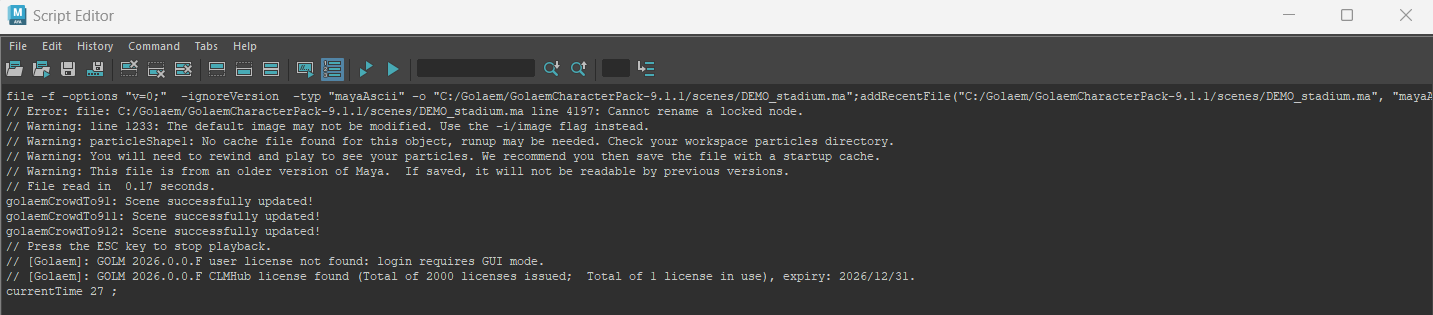
Golaem support two types of license, so you will almost always have a "not found" message for one or another type of license.
- The user license is the one related to the Autodesk User you sign with in your Maya
- The ClmHub license is the one you could get in a studio who is using a network license server
Troubleshooting
Network installation
If you are deploying Golaem on a network drive and loading its .mod file on the user workstation (meaning you did not run the installation on the user computer), they may get some licensing error on Linux.
You need to run the following command on the workstation of each user to register the Golaem product Obviously if needed adjust the
- product key
- product version
- path to the pit config file
sudo /opt/Autodesk/AdskLicensing/Current/helper/AdskLicensingInstHelper register --prod_key D24R1 --prod_ver 2026.0.0.F --config_file /home/myuser/Golaem/Golaem-9.2-Maya2026/plug-ins --lic_method USER --eula_locale en_US
Others
Check this page for help on specific problems and troubleshooting procedures.
Getting some help
If nothing above worked, please get in touch