About Engineering Project Management roles and groups
For users with Fusion connected sites, references to the 'Items' workspace should be the 'Components' workspace.
In Fusion Manage, roles are used to assign a set of permissions for a specific workspace. Each distinct user profile requires a role in each workspace.
Roles
View-only roles
The most basic roles in this solution grant the ability to read the data in each workspace:
- Engineering Project Templates [R]
- Engineering Projects [R]
- Engineering Project Activities [R]
Administrative Roles
The read-write [R/W] roles grant the ability to create and modify objects in each workspace:
- Engineering Project Templates [R/W]
- Engineering Projects [R/W]
- Engineering Project Activities [R/W]
Additional Roles
This template contains an additional role that to enable specific people to approve projects.
- Engineering Projects [APPROVAL]
The only permission this role provides is a workflow permission to approve projects in the Engineering Projects workspace. The [APPROVAL] permission is required in addition to either the [R] or the [R/W] permission. You do not necessarily need to be able to modify a project in order to approve it.
Groups
Groups are not provided as part of this solution. In Fusion Manage, roles need to be assigned to one or more groups. Then, you need to be a member of one or more of those groups to inherit the permissions of the group.
Included in this template is a value picklist that define specific teams. The teams are as follows.
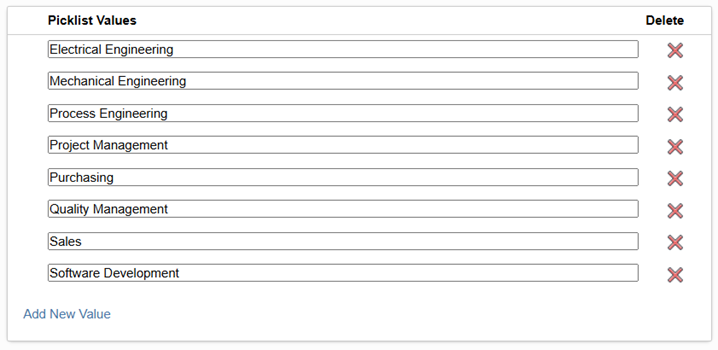
Within an engineering project, specific team members are chosen to belong to one or more teams listed in this picklist. Autodesk recommends that the groups you create in your tenant align with this picklist. Alternatively, you can modify this picklist to align with your organization’s teams.