Create an engineering project template
For users with Fusion connected sites, references to the 'Items' workspace should be the 'Components' workspace.
 beside them. Click the icon to view a tooltip with more information to help you fill in the field or section.
Navigate to Workspaces > Engineering Project Management > Engineering Project Templates.
Click Create
 .
. The template has 5 tabs. The first one is the Project Template tab which defines the attributes and teams which will be needed in the creation of the project from the template. It is divided into three sections.
In the Header section fill in all fields as necessary. Required fields are marked with a red asterisk.
In the Title field, enter the name for the template. This name should clearly identify the template in the picklist of templates to select from when creating a project.
(Optional) In the Description field, enter descriptive text to describe the usage and scope of the template.
In the When Milestones Finish field, select from one of the following options. These options determine whether and which activities are automatically triggered to start when a milestone ends. This can ensure you do not forget to start the next milestone and saves you a number of clicks to do it manually.
- Do Nothing – When a milestone is marked complete, no activities are triggered to start.
- Start Dependent Activities – When a milestone is marked complete, start the activities that are marked to start with the next milestone that span more than one milestone (dependent).
- Start Next Milestone Activities – When a milestone is marked complete, start the next milestone’s bundle of activities only.
- Start Next Milestone Activities & Dependent Activities - When a milestone is marked complete, start both the activities that belong to the next milestone as well as any marked to start with the next milestone that span more than one milestone (dependent).
The Project Team Members section enables you to specify the team members that belong to each team within the context of any project created from this template. In other words, it creates a mapping between the team name and the members in the team that is only relevant for projects created from this template. Then, when defining activities in the Template Activities tab, you assign each activity to a team instead of specific people to allow for flexibility. In this section you may define up to 5 teams.
Note: Your site administrator can adjust the names of these teams to better align with your organization’s structure.- In the Teams drop-down list, select the first team.
- In the Users field, begin typing or select one or more team members to be included in this team.
- Repeat for up to five teams.
The Milestones section defines the length of time for each milestone for the project in terms of offset days from the end of the previous milestone. This gives a buffer on top of the duration of each activity. Each milestone has an assignee who will be able to complete all the tasks in the milestone if no other team members are assigned to specific activities.
Note: There are five milestones by default. Your site administrator can adjust this if necessary.- In the Assignee field, begin typing or select one team member to be the default person responsible for the milestone.
- In the Offset (days) field, enter in the number of days to specify the length of each milestone.
- (Optional) Select Auto Start to automatically assign and move activities to a state of Requested upon initiation of the project. Milestones and their activities will still need to be accepted by the assigned individual in order for the activities to move to In Work.
Click Save.
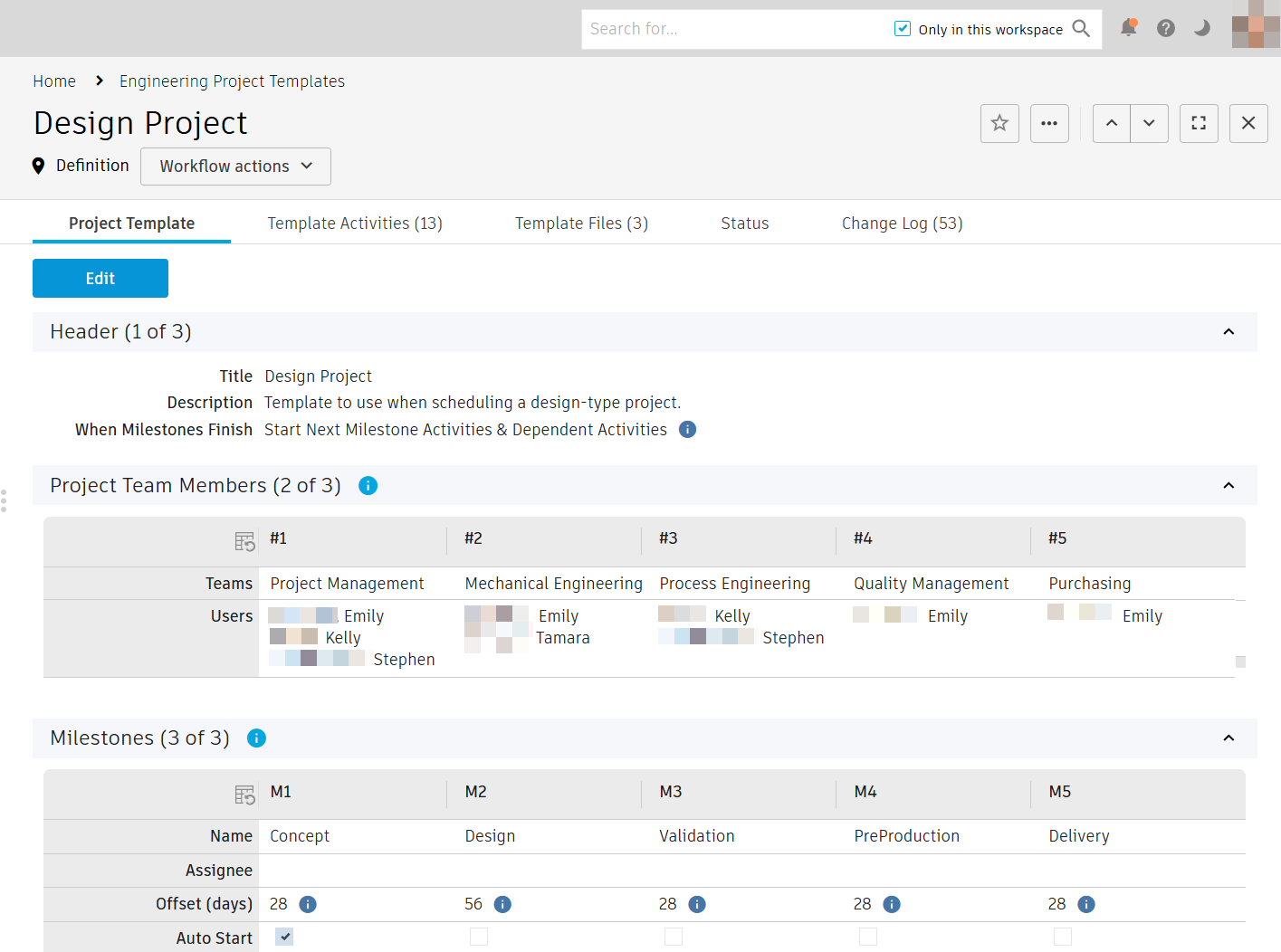
The engineering project template is created and added to the list of engineering project templates in the Engineering Project Templates workspace. It has a status of Definition.