Use Advanced Search
You can access Advanced Search in two ways:
From the Dashboard:
In the search field at the top-right corner of the Dashboard, click Advanced.

From the Navigation Menu:
Click the main navigation menu
 .
.Select Search from the list.
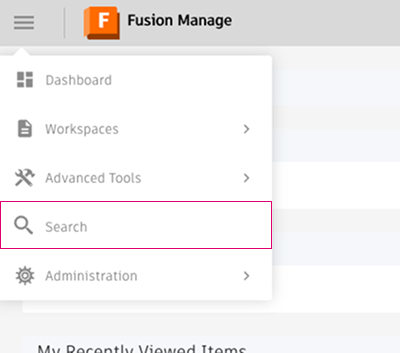
The Advanced Search page opens.
Refine your search
Enter a search term in the field at the top of the page.
Use the filter browsers on the left side of the page to refine your results:
Workspace filters:
Select a workspace or expand it to filter by specific fields.
Click the checklist
 next to a workspace to see available fields.
Selected workspaces appear as green tags. Selected fields appear as outlined tags.
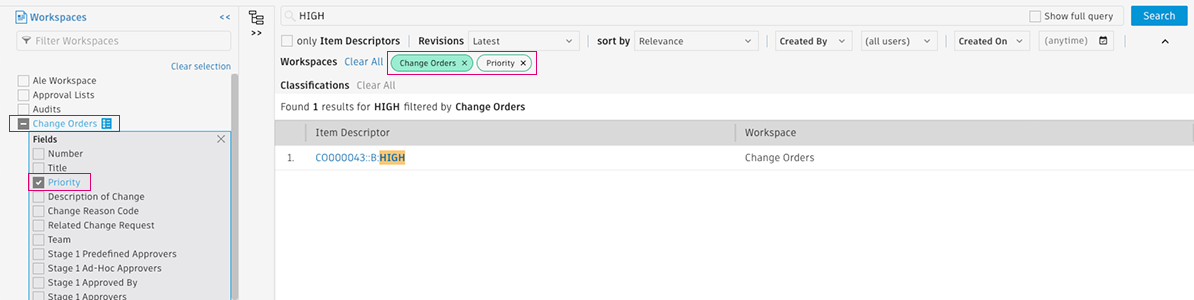
Classification filters:
Select a class or expand it to filter by its specific properties.
Click the checklist
next to a class to see its properties.Enter values for properties to refine your search further.
Selected classes appear as yellow tags. Selected properties appear as outlined tags.
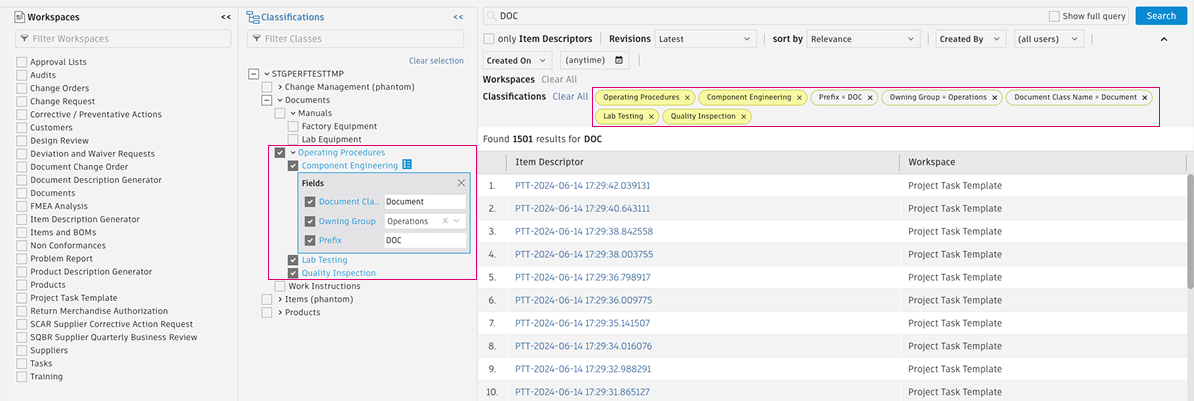
Click Search or press Enter to refine results.
To remove a filter, click the X on its tag, or uncheck it in the filter browser.
Tips
- Use Full Query Mode to create advanced queries using arithmetic operators and logic. See Advanced search reference for examples.
- You can reference classification properties in the Search Query Language to build custom searches. See Item properties by workspace and class for examples.
- You can also use Advanced Search as a classification browser, listing all items assigned to a specific class.