A level specifies a virtual 2D surface used as the origin for a view or for drawing elements.
A level is specified by a value of the Z coordinate. From the level list, you can select levels created automatically at the bottom and top of each story. You can also add your own levels to this list.
To display the level list, position the mouse cursor on the Z = box at the bottom of the drawing area, showing the current level.
To add a level, click the Z = box, enter a value of the Z coordinate, and press Enter.
To delete a level, click the x icon in the level row on the list.
You save levels with a project.
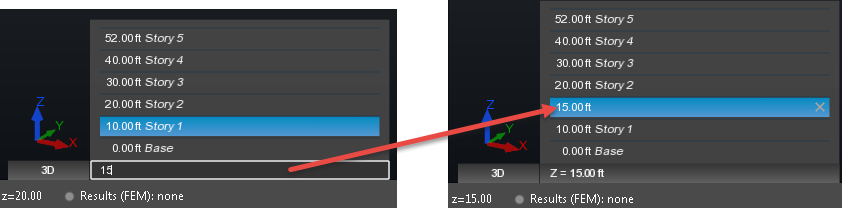
Example: Adding a level Z = 15 ft to the level list
Note: While drawing, the cursor may snap to elements on different levels. Verify that the Z coordinate of the element points corresponds to the level that you selected.