Aligned local and cloud scan to mesh
Get the same meshing engine and one entry point whether you process on your machine or in the cloud.
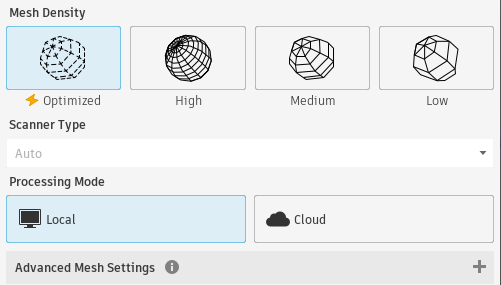
Get the same meshing engine and one entry point whether you process on your machine or in the cloud.
What is it?
Scan to mesh in ReCap Pro 2027.1 now runs on a single engine. Previously, local and cloud processing used different engines. Now you open one Scan to mesh window and choose a processing mode: Local to process on your computer, or Cloud to process using the cloud service.
The window also includes a new Optimized mesh density option. ReCap Pro analyzes your point cloud first, then runs scan to mesh at the density that suits your data.
Why is it useful?
- Consistent results. The same engine and settings apply in both modes, so you can choose local or cloud based on your hardware and schedule, not on how the mesh will turn out.
- One place to start. One window replaces separate local and cloud tools.
- Less guesswork on settings. Keep the default Optimized option and ReCap Pro chooses a suitable mesh density. It is a good baseline before you decide whether to increase or decrease density.
- Know what was used. After meshing, check the processing parameters in the Mesh Editor properties for the mesh.
How it fits your workflow
Prepare your point cloud, open Scan to mesh, keep Optimized selected, pick Local or Cloud, and submit. Cloud processing lets you close the window and keep working while the job runs.
Related topics
- Generating a mesh model
- Best practices for scan to mesh settings
- Single step processing