Mesh pre-classification (tech preview)
Let AI classify common building elements on your mesh, so you start from classified layers instead of an empty mesh.
Let AI classify common building elements on your mesh, so you start from classified layers instead of an empty mesh.
What is it?
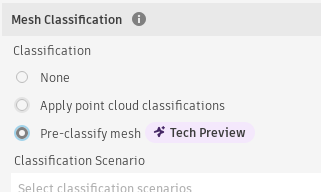
Mesh pre-classification uses a pretrained AI model to assign classes to your mesh as part of cloud scan to mesh. It identifies common elements such as walls, floors, ceilings, doors, windows, pipes, and furniture. Classes are grouped into scenarios (infrastructure and site, manufacturing and industrial, MEP and building services, building elements, and interiors and furnishings). Run one or more scenarios, or choose individual classes.
Mesh classification options when you create a mesh:
- None. No pre-classification.
- Apply point cloud classifications. Carry existing point cloud classifications onto the mesh.
- Pre-classify mesh. Use the AI model to classify the mesh.
Pre-classify mesh is a tech preview. It requires structured scans and is available with cloud processing. Data you send to the cloud service is not used to train or enhance the AI model.
Why is it useful?
- Skip the blank start. Classifying a mesh by hand means selecting surfaces and moving them into layers. Pre-classification does the first pass for you.
- Review, don't build. Check each classified layer, then move the surfaces you approve into your own classification hierarchy.
- Keep working. After upload, you can continue using ReCap Pro. You are notified when results are ready.
How it fits your workflow
- Create a mesh from a structured scan, choose Cloud, and select Pre-classify mesh.
- When processing completes, download the results from the notification, or add the results file to your project.
- Open the Mesh Editor, review the layers, and use the manual classification tools to refine them.
Related topics
- E57 import with pinhole and cubemap images
- New Mesh Editor classification tools
- Aligned local and cloud scan to mesh