Flow Production Tracking Enterprise Console User Guide
Local installations of Flow Production Tracking are no longer offered. This documentation is intended only for those with existing instances of Flow Production Tracking Enterprise Docker. Click here for a list of our current offerings.
 Contents
- Introduction
- Glossary
- Requirements
- Disclaimer
- SEC Overview
- Getting Started
- Basic Operations
- Flow Production Tracking Update
- Advanced Operations
- Troubleshooting
- FAQs
- Are backups intrusive?
- Where are backups stored?
- Production and staging are hosted on the same database. Will a restore/sync/upgrade of my staging site impact production?
- Why is upgrade path to major and minor version enforced?
- Where is stored SEC data?
- Can SEC run on one of my Flow Production Tracking servers?
- Are Event Trims intrusive?
- Where are trimmed events stored?
- How to remove a Cluster?
- How SEC detect Flow Production Tracking Instances?
Introduction
The Flow Production Tracking Enterprise Console (SEC) allows clients to manage by themselves their Flow Production Tracking sites hosted on their own infrastructure.
This User Manual gives some guidelines on how to achieve management of your cluster.
Glossary
SEC. Flow Production Tracking Enterprise Console.
Cluster. Global term that refers to a Flow Production Tracking ecosystem. A Cluster can contain many Flow Production Tracking Instances. Most clients will usually just have one cluster, containing all the servers in their production and staging instances. The topology of the cluster may differ as different components can be hosted on different servers. By default, all components are running on the same server.
Flow Production Tracking Instance. Refers to your Flow Production Tracking site and all its components, e.g., “Flow Production Tracking.teststudio.com”.
App Server(s). Application server. The application server is the server on which the Flow Production Tracking application is running. There may be more than one application server.
DB Server. Database server, running PostgreSQL.
API Server. Variation of the App Server that only processes API calls (no Web UI).
Hosts. Represent a server on which some Flow Production Tracking Components are running.
Operations. Refers to all operations executed through the SEC.
Web Head. Generic term that is often use to designate an App and/or API servers.
Requirements
The Flow Production Tracking Enterprise Console is delivered as a Docker container. The SEC can be run anywhere in your Studio infrastructure, as long as all servers are accessible from the host running SEC.
SEC Hosts Requirements
- Docker compatibility:
https://docs.docker.com/engine/installation/linux/centos/.- CentOS 6.5+ is supported, even if no longer officially by Docker.
- Access to YUM.
- Access to EPEL.
- Access to every server of your Flow Production Tracking Cluster.
Disclaimer
The SEC is an admin power tool, and should be treated as such. Only administrators of the system should have access to the SEC. SEC by itself doesn’t enforce security, so it is the responsibility of the administrators to restrict access to it.
When using SEC on a production, always take special care. Be sure to back up the production sites before taking any action. Production operations should be performed outside working hours, as they can be disruptive. The same care should be taken with staging operations if they are hosted on the same servers as the production cluster.
SEC Overview
This guide assumes that you already successfully installed the SEC. If this is not the case, please refer to the Flow Production Tracking Enterprise Console Installation Procedure.
Home Page (Clusters)
The Home page is the main SEC entry point. It gives information about your Clusters.

A. Tab displaying all the clusters available. This is the home page. When you first use the SEC, no cluster is available. You must create one. See Creating a Cluster for more details.
B. Tab displaying details about the current cluster.
C. Tab displaying information about all servers in the cluster.
D. Tab displaying the history of all operations run in the SEC.
E. Tab displaying a list of all Flow Production Tracking Releases available.
F. Cluster list.
G. Allows addition of new cluster.
Cluster Details Page
The Cluster Details page provides contextual information about a cluster.
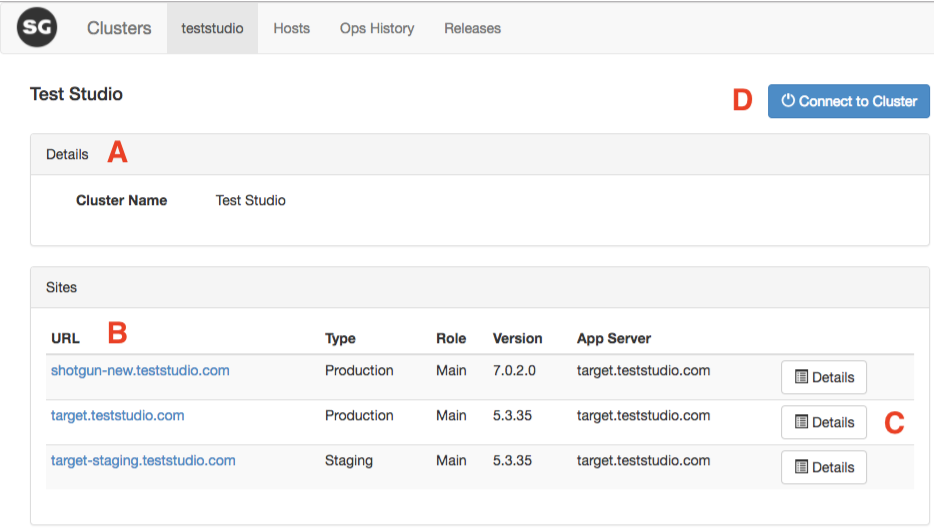
A. Cluster Details.
B. Information about available sites.
- URL: Site url. Selecting the site will open a browser at the site URL.
- Type: Production.
- Staging or Dev.
- Version: Current Flow Production Tracking version.
- App Server hostname.
C. Additional details about a cluster/site, and the entry point to operations. See Site Details Page.
D. Connecting to a Cluster allows operations to be executed on it.
Site Details Page
Accessible through the Cluster Details page, the Site Details page allows operations to be executed on a site. It also exposes some configuration options that are editable. The settings section is for advanced users only.
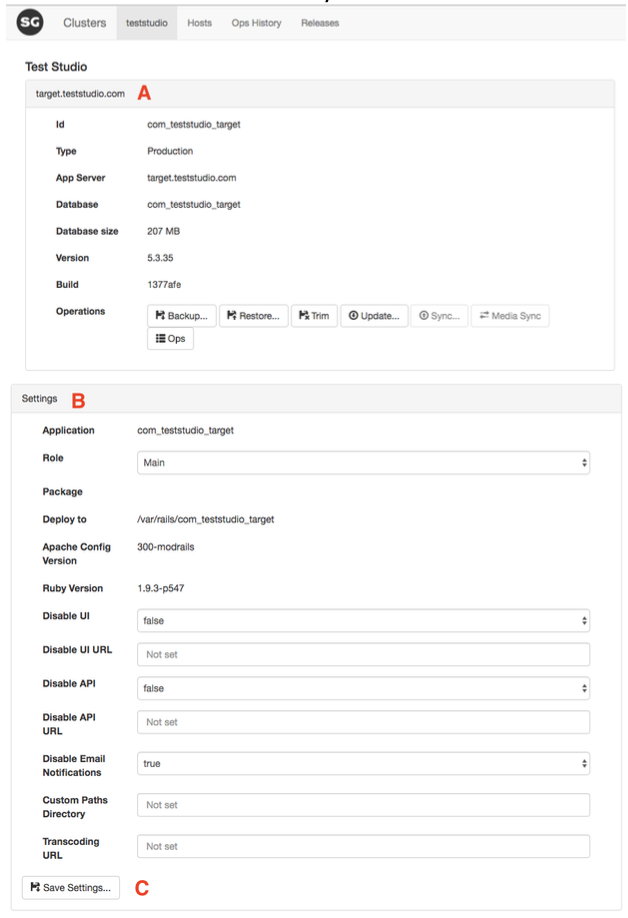
A. Site information and operations.
B. Cluster settings. These are advanced options which should usually not be modified. Hover over the settings label in the UI to have more information about some settings.
C. Persist settings. Settings are stored as JSON and represent a site configuration. For settings to be applied to a cluster, the site usually needs to be redeployed.
Hosts Page
The Hosts page gives information about all hosts in a cluster. It also gives you the ability to modify/add new hosts to your cluster.

A. Add a new host to the cluster.
B. Edit the properties for a new host.
C. Remove a host from the cluster.
Operation History Page
The Operations page lists operations history. All logs for past operations are available for consultation.
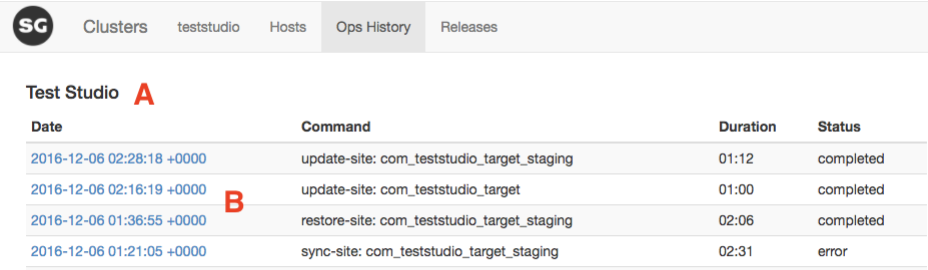
A. Operation history.
B. Selecting an operation will give more details about the operation (status, duration, log).
Releases Page
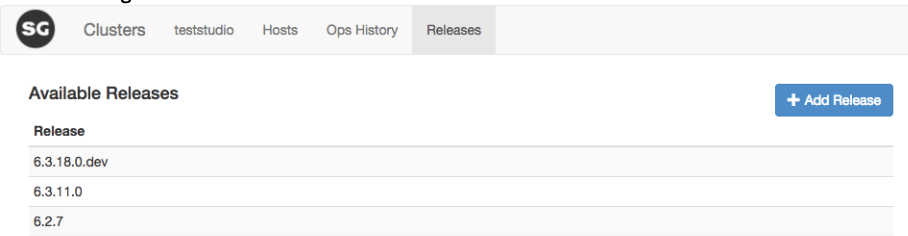
List the Flow Production Tracking releases available to SEC and allow to add new releases.
Getting Started
Installing Flow Production Tracking Enterprise Console
All the details on how to install SEC can be found in the Installation of Enterprise Console for Flow Production Tracking Docker topic.
Creating a Cluster
SEC can introspect your cluster and automatically determine your Flow Production Tracking configuration. The only thing you need to do is create a Cluster.
- Go to the SEC home page.
- Make sure you can
SSHto the Main App Server from the SEC host. - Select + Add Cluster. a. Fill in all information.
- If all the information is accurate, the new cluster will be created. SEC automatically connects to the created cluster.
- You are now ready to execute operations on your new cluster!
Connecting to a Cluster
When you create a new Cluster, you will automatically connect to it. However, if you start SEC later, you will need to connect.
- Go to the SEC home page.
- Select your Cluster.
- Select Connect to Cluster.
Basic Operations
All Operations require you to be connected to a Cluster first. See Connecting to a Cluster.
Backup
Backup your database locally on the App Server.
- Connect to your Cluster.
- In the site list, select Details for the site you wish to backup.
- In the Operations list, select Backup...
- Some details about the backup operation will be displayed.
- To start the backup, select Backup.
Restore
Restore a backup. Backups you are restoring need to be in a fixed location. See Where are backups stored?.
- Connect to your Cluster.
- In the site list, select Details for the site you wish to restore.
- In the Operations list, select Restore...
- Select the backup to restore.
- Select the version of Flow Production Tracking to use for the backup. If the backup was taken using the SEC, the version at which Flow Production Tracking was will be part of the file name. It is highly recommended to use the same version as the backup. A prior version cannot be used.
- Select Restore.
Trim Events
Trim your site events. This will remove all events before a given date from the database. Trim events will be stored in CSV format at the root of your Flow Production Tracking site.
Trimming events can help improve the performance of your application and reduce backup/restore/upgrade duration.
Trimming events can add pressure on the site. See Are Event Trim intrusive?.
- Connect to your Cluster.
- In the site list, select Details for the site you wish to trim events for.
- In the Operations list, select Trim.
- Edit the date before which events will be trimmed.
Flow Production Tracking Update
Upgrading Flow Production Tracking to a new version is one of the most common operations you will execute with SEC. To update to a new version of Flow Production Tracking, you must first download the release. This means that you will need to have Internet access. However, SEC itself doesn’t need access; you can get the release and copy it to your SEC.
Notes:
- We strongly suggest that you test new versions in your Staging cluster first, and test exhaustively! This will also help you figure out the maintenance time.
- During an update, the Flow Production Tracking site will be in maintenance.
- You can sync a staging instance with the production instance. See Production to Staging Sync.
Getting Flow Production Tracking Releases
Learn more about getting releases in the Installation of Enterprise Console for Flow Production Tracking Docker topic, and review Flow Production Tracking Enterprise Docker Releases here.
Adding a New Release to the SEC
To make a Flow Production Tracking release available to SEC, simply copy the Flow Production Tracking tar file to the SEC Release Folder. See Where is stored SEC data?. You can also use the UI.
- Select the Releases tab.
- Select + Add Release.
- Choose the releases to upload. The folder in which the release resides must be available to SEC. This usually means they have been copied on the SEC host.
- Select Upload.
Executing the Update
- Connect to your Cluster.
- In the site list, select Details for the site you wish to update.
- Select Update...
- Choose the version to upgrade to. For a version to be available, it must have been added
to the SEC release folder.
- You can choose to back up the database first (recommended).
- You can choose to put the site in maintenance during the update (recommended).
- Select Update.
Major and Minor Version Updates
Update to major and minor versions must be done is sequence. SEC will enforce this workflow. For example, to upgrade from 6.2.1 to 6.3.4, you should first update to 6.1.4, then to 6.3.4—learn more about upgrade paths here. To learn more about why this is needed, see Why is upgrade path to major and minor version enforced?.
Suggested Workflow
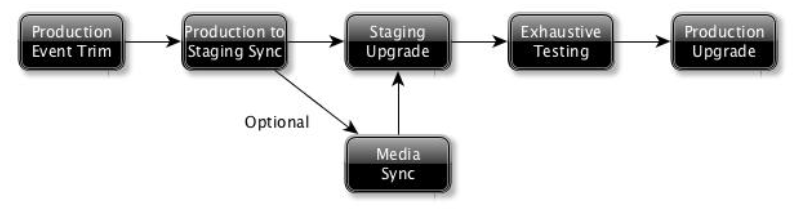
Here is the suggested workflow that we highly recommend you follow when updating Flow Production Tracking. Using this workflow will help you minimize risks and get the best out of Flow Production Tracking.
- Production Event Trim. We suggest removing events older than six months. Always make a backup first, as we never know what can happen!
- Production to Staging Sync. Will sync your production data to your staging site. This will ensure your testing is as relevant as possible. This also makes sure that your data can be migrated without issues to a new Flow Production Tracking version.
- Media Sync. Optional step. Only needed if your testing requires the media to be available. Flow Production Tracking will work without thumbnails and media assets.
- Staging Upgrade. Update and test the latest features!
- Exhaustive Testing. To prevent any issues in production, we highly suggest you test all your common Flow Production Tracking workflows.
- Production Upgrade. When your testing is conclusive, update your production site.
Staging Operations
Production to Staging Sync
This operation allows you to sync your production data to your staging site. The main use case is to test new workflows or new versions of Flow Production Tracking.
Syncing operations consists of a backup of the source site, and a restore to the target site. It is basically non-intrusive for the source site. The target site will be in maintenance, and the database for that site will be overwritten.
- Connect to your Cluster.
- In the site list, select your staging site.
- Select Sync...
- Select the site to sync from, and the version for which the staging site will be updated. It should usually be the same version that is running in production, but also supports upgrading to a new version at the same time.
- Start the operation by selecting Sync.
Production to Staging Media Sync
This operation allows you to sync your media between your Instances. We use sync to synchronize media between two Instances. When synching, we add missing data only, we don’t remove files in the destination that are not found in the source. No data will be removed from the target.
- Connect to your Cluster.
- In the site list, select your staging site.
- Select Media Sync.
- Select the site to sync from.
- Start the operation by selecting Sync.
Advanced Operations
Low-level operations should also be executed with care. Do not use unless you know what you are doing!
All high-level operations in SEC are constructed out of a set of low-level operations. Some operations are available to the user. If something unexpected happens, then the user may need to execute some low-level operations.
This section underlines some operations that may be useful to you.
Advanced Operations Page
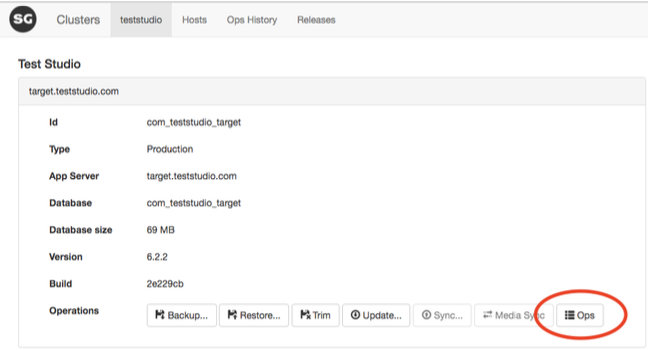
The Advanced Operations Page can be accessed from the Site Details. You will find information about each operation in the Advanced Operations Page.
Troubleshooting
Reporting an Issue
Reporting issues for the SEC follows the same procedure as reporting issues for Flow Production Tracking or Toolkit. Connect with support here.
FAQs
Are backups intrusive?
Backups are usually non-intrusive, both at the database and system level. A backup will add a bit of load on the database, but this is usually unnoticeable.
Backups are also non-intrusive at the database level. The only exception is with table modifications (ALTER). In Flow Production Tracking, tables are modified when new fields are added to an Entity. When doing a backup, it is better to prevent field additions. Even then, damage should be limited, since we timeout lock acquisition for field addition very quickly.
Where are backups stored?
All backups executed using SEC are stored under <site_dir>/db_backup.
Ex.: /var/rails/com_teststudio_target_staging/db_backup
Production and staging are hosted on the same database. Will a restore/sync/upgrade of my staging site impact production?
Even if stored on the same hardware, different sites are segregated. However, some load may be added on the server during the operation, but production will not be impacted.
Why is upgrade path to major and minor version enforced?
The database schemas can be change between minor and major version. To make sure that migration is executed correctly, we force a known upgrade path, which is from minor to minor. We are not changing schemas in patch versions (major.minor.patch)
Where is stored SEC data?
SEC data is mounted in Docker using a volume. This volume is located at /var/shotgun/sec. It contains various sub-folders:
./clusters |
JSON data for each cluster |
./keys |
SSH Keys |
./operations |
Operation logs |
./releases |
Flow Production Tracking releases |
Can SEC run on one of my Flow Production Tracking servers?
Yes. SEC’s only dependency is Docker. Since SEC runs inside a container, there are no package dependency clashes possible.
SEC’s footprint is minimal, and the fact it will share resources with other Flow Production Tracking components should not be a factor.
Are Event Trims intrusive?
Yes, they can be intrusive, especially if the quantity of events trimmed is important. Removing a huge quantity of data will likely trigger PostgreSQL vacuuming. That can add significant load on the system. It is therefore preferable to notify the team, and to execute outside production hours.
Where are trimmed events stored?
They are stored under <site_dir>
Ex.: /var/rails/com_teststudio_target_staging/
How to remove a Cluster?
The only way right now to remove a Cluster is to do it manually. Remove the cluster file and restart SEC.
cd /var/shotgun/sec/clusters
sudo rm -f test.json
How SEC detect Flow Production Tracking Instances?
When creating a new Cluster, you provide SEC with the address of your Application Server. SEC will find the Apache configuration, and from there, find out the information it needs to manage your instance. SEC is making two assumptions that must be meet for the introspection to work.
- httpd is in the shotgun user
PATHsource /etc/profile && which httpd
- Flow Production Tracking sources can be found at
/var/rails/<reverse_site_name>
SEC has a pre-requisite that the Flow Production Tracking code is stored under /var/rails/<reverse_site_name>. If this is not the case, you can create a symlink, modify Apache vhost and restart your Flow Production Tracking site.
# As the shotgun user, Create a symlink to /var/rails
sudo mkdir /var/rails
sudo ln -s /cur/shotgun/<reverse_site_name>
/var/rails/<reverse_site_name>
# Modify the Shotgun Apache configuration
sudo vi /etc/httpd/conf.d/<reverse_site_name>