Copy and paste page filter
You can now copy a page filter from one page and paste it onto another page of the same entity type. Instead of rebuilding a complex set of filter conditions by hand on each page, set up the filter once and reuse it wherever you need it, even in other projects.
The copied filter is stored in your browser, so you can paste it only in the same browser, on the same site. Paste Filter is disabled if you haven't copied a filter, or if the copied filter is from a different entity type.
How to copy and paste a page filter
To copy a page filter:
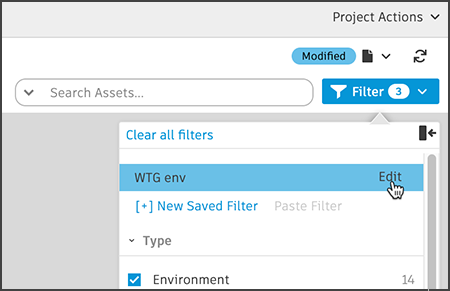
In the Filter Panel, hover over the page filter to copy and click Edit.
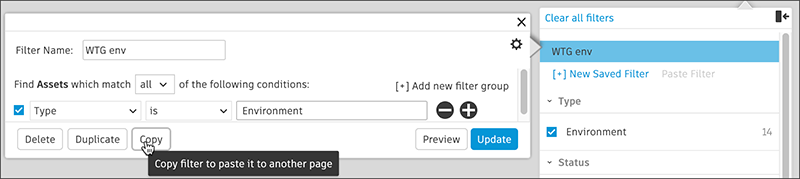
In the filter editor, click Copy.
To paste the page filter:
Go to another page of the same entity type. For example, if you copied a filter from a Shots page, go to another Shots page.
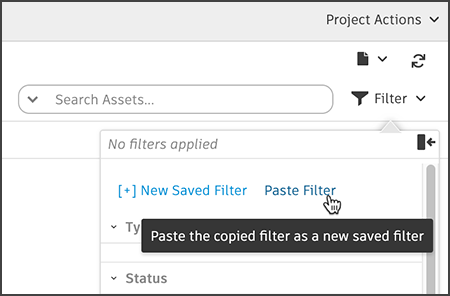
In the Filter Panel, click Paste Filter.
The filter is added to the page as a new page filter and applied. If the page already has a filter with the same name, the pasted filter is named "[original name] Copy".
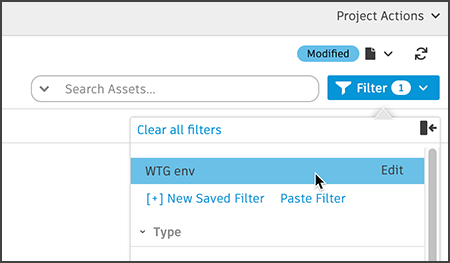
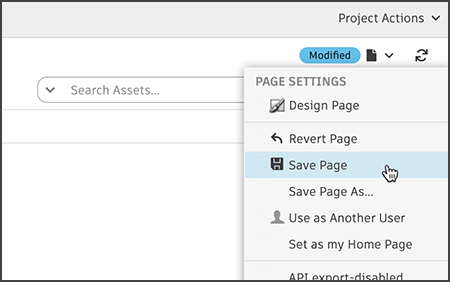
Save the page to keep the filter on the page.
When you paste a filter onto a page in a different project, project-related conditions, such as "current project", are updated for the destination page.
Documentation
For more information about page filters, see Searching and Filtering.
Release Information
Version:
8.89
Release Date:
October 2026