Drag and Drop
The DragManager class (scaleform.clik.managers.DragManager) provides support to initiate and manage drag operations. The class behaves similar to a singleton, and provides an instance property to access the one and only object. Using this object, developers can start and stop drag operations.
To start a drag, dispatch a DragEvent.DRAG_STATE with properties related to the new drag. DragManager.handleStartDragEvent() will receive that event and start the drag based on the properties of the event. The drag will then be managed by the DragManager until a MouseEvent.MOUSE_UP event is received, causing DragManager.handleEndDragEvent() to be called.
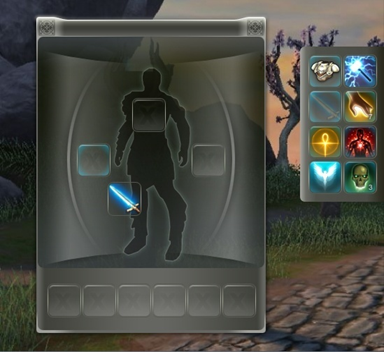
Figure 64: DragDemo in action.
DragManager relies on the IDragSlot interface that defines functions for efficiently communicating with available IDragSlots throughout the UI. DragManager only performs drag management. It is up to developers to create components that utilize the DragManager to provide true drag and drop support.
Scaleform CLIK includes a sample IDragSlot implementation called DragSlot (scaleform.clik.controls.DragSlot). The DragSlot extends UIComponent and thus is classified as a CLIK component. It has several unique features that complement the DragManager. The DragSlot is designed to contain a MovieClip/Sprite/Bitmap that will be dragged. However, DragSlot also mimics many of Button’s behaviors that allow it to also be used as a Button.
The DragSlot has a concept of drag types. These drag types can be configured per DragSlot to enables the component to allow or disallow a drop operation. To complement these drag types, the DragSlot also installs event listeners for dragBegin and dragEnd with the DragManager. This enables the DragTarget to visually display whether or not it can accept a drop operation.
Ultimately, DragSlot is merely a sample implementation of IDragSlot and many of its functions have been stubbed out to be replaced sub-classes that communicate more closely with a data backend. For a sample of a fully-featured DragSlot subclass, take a look at the MMO UI Kit, which uses DragSlot as the base class for draggable content throughout the UI.