Adding Scaleform CLIK Class Paths to Adobe Animate
The Flash class path must be set up for the Scaleform CLIK classes to be exposed to the authoring environment. You will need to set up the class paths for ActionScript 3.0.
- Launch Animate CC.
- Go to Edit > Preferences and select Compiler.
- Add a new Source path by pressing the Plus [+] button at the top.
Click the Browse to Path icon, to select the directory where the Scaleform CLIK components are installed. In a default installation on Windows, this is C:/Program Files/Autodesk/Scaleform/GFx SDK 4.6/Resources/AS3/CLIK/ and on Mac, the components are located in scaleform_gfx_4.6_macos/Resources/AS3/CLIK/ in the installed Scaleform 4.6 SDK directory.
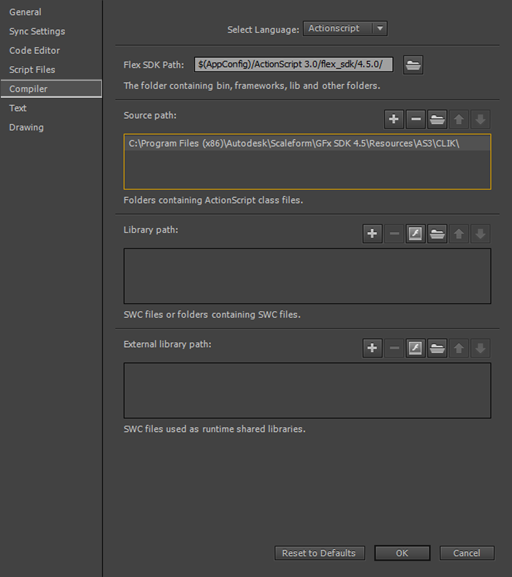
Press OK to close the Preferences window.