Rendering Flash
The first step in the integration process is to render a Flash animation on top of the 3D background. This involves instantiating a GFx::Loader object to manage loading of all Flash content globally for the application, a GFx::MovieDef to contain the Flash content, and a GFx::Movie to represent a single playing instance of the movie. Additionally a Render::HAL object will be instantiated to act as the interface between Scaleform and the implementation-specific rendering API, in this case DirectX. We also discuss how to cleanly deallocate resources, respond to lost device events, and handle fullscreen/windowed transitions.
A version of ShadowVolume modified with this section’s changes can be found in Tutorial\Section4.1. The code shown in this document is for illustration and is not complete.
Add the required header files to ShadowVolume.cpp:
#include "GFx_Kernel.h"
#include "GFx.h"
#include "GFx_Renderer_D3D9.h"
Several Scaleform objects are required to render video and will be kept together in a new class added to the application, GFxTutorial. In addition to making the code cleaner, keeping Scaleform state together in a class has the advantage that a single delete call will free all Scaleform objects. The interaction of these objects will be described in detail in the steps below.
    // One GFx::Loader per application
    Loader           gfxLoader;

    // One GFx::MovieDef per SWF/GFx file
    Ptr<MovieDef>   pUIMovieDef;

    // One GFx::Movie per playing instance of movie
    Ptr<Movie>  pUIMovie;

    // Renderer data
    Ptr<Render::D3D9::HAL>  pRenderHAL;
    MovieDisplayHandle      hMovieDisplay;
The first stage of Scaleform initialization is to instantiate a GFx::System object to manage Scaleform memory allocation. In WinMain we add the lines:
// One GFx::System per application
GFx::System           gfxInit;
The GFx::System object must come into scope before the first Scaleform call and cannot leave scope until the application is finished using Scaleform which is why it is placed in WinMain. GFx::System as instantiated here uses Scaleform’s default memory allocator but can be overridden with an application’s custom memory allocator. For the purposes of this tutorial it is sufficient to simply instantiate GFx::System and take no further action.
GFx::System must leave scope before the application terminates, meaning that it should not be a global variable. In this case it will go out of scope when the GFxTutorial object is freed.
Depending on the structure of your particular application it may be easier to call the GFx::System::Init() and GFx::System::Destroy() static functions instead of creating the GFx::System object instance.
The remainder of Scaleform initialization will be performed right after the application’s WinMain does its own initialization in InitApp(). Add the following code right after the call to InitApp():
    gfx = new GFxTutorial();
    assert(gfx != NULL);
    if(!gfx->InitGFx())
        assert(0);
GFxTutorial contains a GFx::Loader object. An application typically has only one GFx::Loader object, which is responsible for loading the SWF/GFx content and storing this content in a resource library, enabling resources to be reused in future references. Separate SWF/GFx files can share resources such as images and fonts saving memory. GFx::Loader also maintains a set of configuration states such as GFx::Log, used for debug logging.
The first step in GFxTutorial::InitGFx() is to set states on GFx::Loader. GFx::Loader passes debug tracing to the handler provided by SetLog. Debug output is very helpful when debugging, since many Scaleform functions will output the reason for failure to the log. In this case we use the default Scaleform PlayerLog handler, which prints messages to the console window, but integration with a game engine’s debug logging system can be accomplished by subclassing GFx::Log.
// Initialize logging -- Scaleform will print errors to the log stream.
gfxLoader->SetLog(Ptr<Log>(*new Log()));
GFx::Loader reads content through the GFx::FileOpener class. The default implementation reads from a file on disk, but custom loading from memory or a resource file can be accomplished by subclassing GFx::FileOpener.
// Give the loader the default file opener
Ptr<FileOpener> pfileOpener = *new FileOpener;
gfxLoader->SetFileOpener(pfileOpener);
Render::HAL is a generic interface that enables Scaleform to output graphics to a variety of hardware. We create an instance of the D3D9 renderer. The renderer object is responsible for managing the D3D device, textures, and vertex buffers used by Scaleform. Later on, in HAL::InitHAL, we will pass the Render HAL an IDirect3Device9 pointer initialized by the game, so that Scaleform can create DX9 resources and successfully render UI content.
Now the GFx::Loader is ready to load a movie. Loaded movies are represented as GFx::MovieDef objects. The GFx::MovieDef encompasses all of the shared data for the movie, such as the geometry and textures. It does not include per-instance information, such as the state of individual buttons, ActionScript variables, or the current movie frame.
// Load the movie
pUIMovieDef = *gfxLoader.CreateMovie(UIMOVIE_FILENAME, Loader::LoadKeepBindData | Loader::LoadWaitFrame1, 0);
The LoadKeepBindData flag maintains a copy of texture images in system memory, which may be useful if the application will re-create the D3D device. This flag is not necessary on game console systems or under conditions where it is known that textures will not be lost.
LoadWaitFrame1 instructs CreateMovie not to return until the first frame of the movie has been loaded. This is significant if GFx::ThreadedTaskManager is used.
The last argument is optional and specifies the memory arenas to be used. Please refer to the Memory System Overview document for information on creating and using memory arenas.
Before rendering a movie, a GFx::Movie instance must be created from the GFx::MovieDef object. GFx::Movie maintains state associated with a single running instance of a movie such as the current frame, time in the movie, states of buttons, and ActionScript variables.
pUIMovie = *pUIMovieDef->CreateInstance(true, 0, NULL);
assert(pUIMovie.getPtr() != NULL);
The first argument to CreateInstance determines whether the first frame is to be initialized. If the argument is false, we have the opportunity to change Flash and ActionScript state before the ActionScript first frame initialization code is executed. The second argument is optional and specifies the memory arenas to be used. Please refer to the Memory System Overview document for information on creating and using memory arenas.
Once the movie instance is created, the first frame is initialized by calling Advance(). This is only necessary if false was passed to CreateInstance.
// Advance the movie to the first frame
pUIMovie->Advance(0.0f, 0, true);

// Note the time to determine the amount of time elapsed between this frame and the next
MovieLastTime = timeGetTime();
The first argument to Advance is the difference in time, in seconds, between the last frame of the movie and this frame. The current system time is recorded to enable calculation of the time difference between this frame and the next.
In order to alpha blend the movie on top of the 3D scene:
pUIMovie->SetBackgroundAlpha(0.0f);
Without the above call, the movie will render but will cover the 3D environment with a background stage color specified by the Flash file.
Scaleform must be given the handle to the DirectX device and presentation parameters in order to render. These values are wrapped in the Render::D3D9::HALInitParams structure and passed to the Render::D3D9::HAL::InitHAL function, called after the D3D device is created and before Scaleform is asked to render. InitHAL should be called again if the D3D device handle changes, which can occur on window resizes or fullscreen/windowed transitions.
ShadowVolume’s OnResetDevice function is called by the DXUT framework after initial device creation and also after device reset. The following code is added to the corresponding OnResetDevice method in GFxTutorial:
pRenderHAL->InitHAL( Render::D3D9::HALInitParams(pd3dDevice, presentParams, Render::D3D9::HALConfig_NoSceneCalls));
The InitHAL call passes the D3D device information to Scaleform. The HAL_NoSceneCalls flag specifies that no DirectX BeginScene() or EndScene() calls will be made by Scaleform. This is necessary because the ShadowVolume sample already makes those calls for the application in the OnFrameRender callback.
When the window is resized or the application is switched to fullscreen, the D3D device will be lost. All D3D surfaces including vertex buffers and textures must be reinitialized. ShadowVolume releases surfaces in the OnLostDevice callback. Render::HAL can be informed of the lost device and given a chance to free its D3D resources in the corresponding OnLostDevice method in ScaleformTutorial:
pRenderHAL->ShutdownHAL();
This and the previous step explained initialization and lost devices based on the DXUT framework’s callback system. For an example of a basic Win32/DirectX render loop, see the GFxPlayerTiny.cpp example with the Scaleform SDK.
Because all Scaleform objects are contained in the GFxTutorial object, cleanup is as simple as deleting the GFxTutorial object at the end of WinMain:
delete gfx;
gfx = NULL;
The other consideration is the cleanup of DirectX 9 resources such as vertex buffers. This is taken care of by Scaleform, but for allocation and cleanup that occurs during the main game loop it is important to understand the role InitHAL() and ShutdownHAL() play.
In the DirectX 9 implementation, InitHAL allocates D3DPOOL_DEFAULT resources, including vertex buffer caches. When integrating with your own engine try to place the call to InitHAL in a location appropriate for allocating D3DPOOL_DEFAULT resources.
ShutdownHAL will free the D3DPOOL_DEFAULT resources. Applications that use the DXUT framework, including ShadowVolume, should allocate D3DPOOL_DEFAULT resources in the DXUT OnResetDevice callback and free resources in the OnLostDevice callback. The ShutdownHAL call in GFxTutorial::OnLostDevice matches the InitHAL call in GFxTutorial::OnResetDevice.
When integrating with your own engine, try to call InitHAL and ShutdownHAL together with any other calls to create and free engine D3DPOOL_DEFAULT resources.
The movie must be given a certain viewport on the screen to render into. In this case, it occupies the entire window. Since the screen resolution can change, we reset the viewport every time the D3D device is reset by adding the following code to GFxTutorial::OnResetDevice:
    // Use the window client rect size as the viewport.
    RECT  windowRect   = DXUTGetWindowClientRect();
    DWORD windowWidth  = windowRect.right - windowRect.left;
    DWORD windowHeight = windowRect.bottom - windowRect.top;
    pUIMovie->SetViewport(windowWidth, windowHeight, 0, 0, windowWidth, windowHeight);
The first two parameters to SetViewport specify the size of the framebuffer used, typically the size of the window for PC applications. The next four parameters specify the size of the viewport within the framebuffer that Scaleform is to render into.
The framebuffer size arguments are provided for compatibility with OpenGL and other platforms that may use different orientation of coordinate systems or not provide a way to query the framebuffer size.
Scaleform provides functions to control how Flash content is scaled and positioned within the viewport. We will examine these options in section 4.2 after the application is ready to run.
Rendering is performed in ShadowVolume’s OnFrameRender() function. All D3D rendering calls are made between the BeginScene() and EndScene() calls. We’ll call GFxTutorial::AdvanceAndRender() before the EndScene() call.
    void AdvanceAndRender(void)
    {
        DWORD mtime = timeGetTime();
        float deltaTime = ((float)(mtime - MovieLastTime)) / 1000.0f;
        MovieLastTime = mtime;

        pUIMovie->Advance(deltaTime, 0);
        pRenderer->BeginFrame();

        if (hMovieDisplay.NextCapture(pRenderer->GetContextNotify()))
        {
            pRenderer->Display(hMovieDisplay);
        }

        pRenderer->EndFrame();
    }
Advance moves the movie forward by deltaTime seconds. The speed at which the movie is played is controlled by the application based on the current system time. It is important to provide real system time to GFx::Movie::Advance to ensure the movie plays back correctly on different hardware configurations.
Render::HAL::Display makes DirectX calls to render a frame of the movie on the D3D device. For performance reasons, various D3D device states, such as blending modes and texture storage settings, are not preserved and the state of the D3D device will be different after the call to Render::HAL::Display. Some applications may be adversely affected by this. The most straightforward solution is to save device state before the call to Display and restore it afterwards. Greater performance can be achieved by having the game engine re-initialize its required states after Scaleform rendering. For this tutorial we simply save and restore state using DX9’s state block functions.
A DX9 state block is allocated for the life of the application and used before and after the calls to GFxTutorial::AdvanceAndRender():
// Save DirectX state before calling Scaleform
g_pStateBlock->Capture();

// Render the frame and advance the time counter
gfx->AdvanceAndRender();

// Restore DirectX state to avoid disturbing game render state
g_pStateBlock->Apply();
The final step is to disable the original DXUT-based UI. This is done by commenting out the relevant blocks of code and the final result is in Section4.1\Shadowvolume.cpp. Diff it with the previous section’s code to see the changes. All the changes related to DXUT are marked with comments:
// Disable default UI
...
We now have a hardware-accelerated flash movie rendering in our DirectX application.
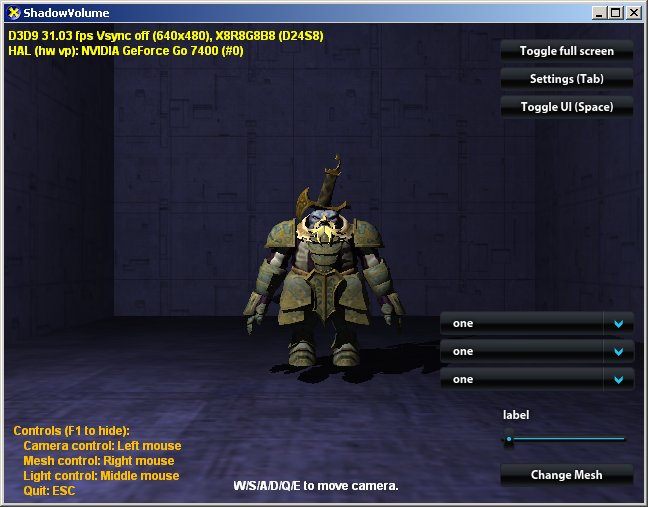
Figure 3: The ShadowVolume application with a Scaleform Flash-based UI