Linking Tab
The Linking tab defines how you approach or retract from your workpiece. All these settings affect your toolpath.
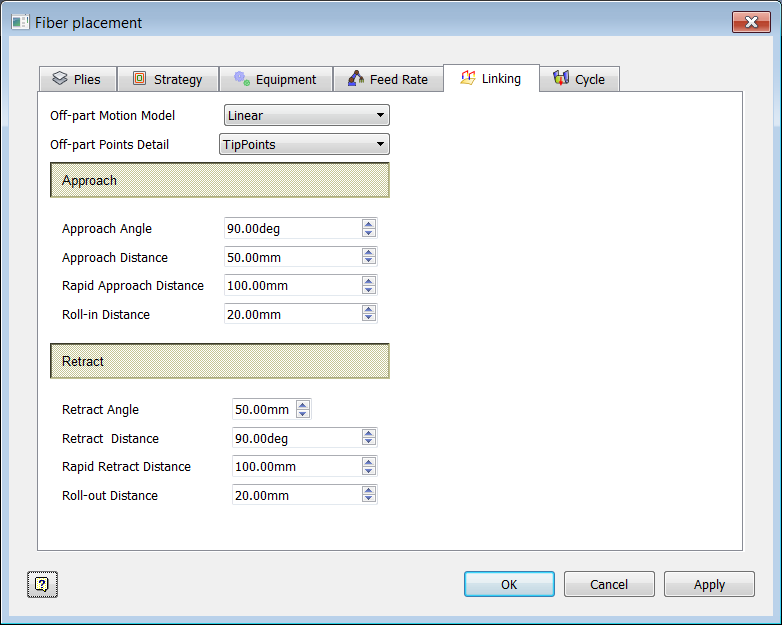
Off-Part Motion Model
This describes the off-part motion strategy to use for the ply. The Approach values in the dialog box control how the approach motion is handled.
Linear
The motion is point-to-point using the "Retract Distance", Approach Distance", "Rapid Retract Distance", and "Rapid Approach Distance" values.
Safety Plane
The motion retracts to and approaches from the safety plane defined in the setup. All motion beyond Retract Distance and Approach Distance is rapid. This option is only available if the setup has a safety plane defined.
Off-Part Points Detail
This controls how much information is generated for each point in the off-part motion trajectory. The Retract values in the dialog box control how the retract motion is handled.
Points Only
Only tip points are computed; interpolation of the orientation is left to the post-processor.
Points and Normals
Tip points and tool axes of each point are computed. The post-processor is responsible for determining the rotation of the head at each point.
All Vectors
The points are fully defined with the tip point, tool axes, and tangent vector.
Approach Values
Approach Angle
The angle of inclination that is used when approaching the surface, where 90 degrees is normal to the surface.
Approach Distance
The distance from the surface, along the Approach Angle, that denotes where the approach starts.
Rapid Approach Distance
For off-part motion models that use it, this controls the distance, starting from the distance defined by Approach Distance, and ending at the distance specified. During this traveling distance, a rapid feed rate is used along the normal of the surface after the linking from the retract motion. This option is disabled if Off-Part Motion Model is not Linear, Surface Following, Cylindrical, Arc Interpolation, or Rotary Plane.
Roll-In Distance
The distance to roll along the surface before the first tow of the course is added.
Retract Values
Retract Angle
The angle of inclination that is used when retracting from the surface, where 90 degrees is normal to the surface.
Retract Distance
The distance to retract from the surface along the Retract Angle.
Rapid Retract Distance
For off-part motion models that use it, this controls the distance, starting from the distance defined by Retract Distance, and ending at the distance specified. During this traveling distance, a rapid feed rate is used along the normal of the surface before linking to the approach motion. This option is disabled if Off-Part Motion Model is not Linear, Surface Following, Cylindrical, Arc Interpolation, or Rotary Plane.
Roll-out Distance
The distance to roll along the surface after laying the last tow of a course.