History
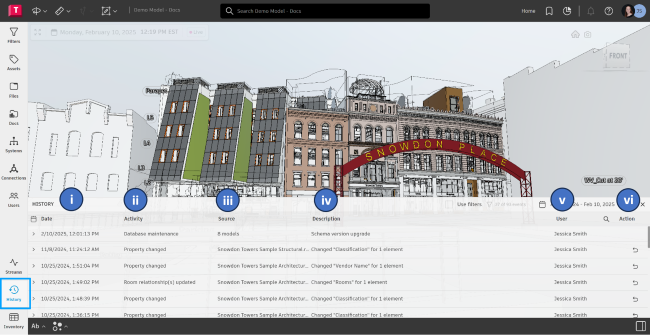
All data contributions within Autodesk Tandem are stored and can be viewed within the history panel. When you open the history panel, you can see a list of events starting with the most current.
The Revert Changes feature allows you to undo specific actions performed on your digital twin, improving flexibility and control when making modifications.
Follow these steps to effectively utilize the twin’s History:
- Access the History Panel
- Navigate to the History Panel in your digital twin interface.
- Column layout:
- Date
- Activity (describes the action taken)
- Source
- Description
- User (who performed the action)
- Action (where the Revert option appears)
- Identify Changes with Revert Option: In the Action column, look for rows that include a Revert button. Not all actions can be reverted. If a row lacks the button, that action is permanent.
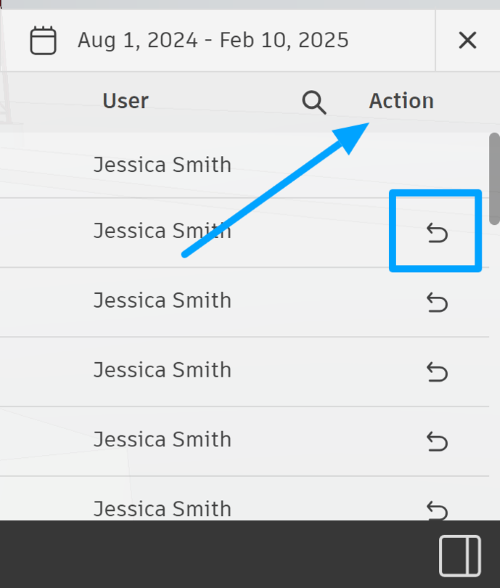
- Reverting an Action
- Click the Revert button on the desired row
- Once completed, the reverted action will move to the top of the history panel, confirming the change.
To see the Revert feature in action, watch the video on our public forum space here.
Revert is particularly useful when importing multiple elements via Excel. If an unwanted change occurs, use the Revert function to restore the previous state easily.
By following these steps, you can efficiently manage, and correct changes made to your digital twin, ensuring a smooth and flexible experience.