Export a flat BOM to an Excel spreadsheet
You can export a flat list of all parts included within an item's eBOM to an Excel spreadsheet. Each row contains one part where the quantity is tallied across the entire eBOM, taking into account its immediate parents' quantities.
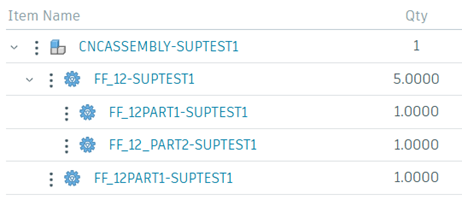
For example, in the following BOM, the quantity calculated for the FF_12PART1-SUPTEST1 part in the Excel spreadsheet would be (5 x 1) + 1 = 6.
The spreadsheet includes most columns shown in the BOM table including item attributes, eBOM attributes, and any additioal custom attributes. The BOM is exported to an XLSX file, which supports up to 1 million rows.
- In the project's BOM (
 ) section, select the item for which you want to export a flat BOM.
 - Select more actions
 > Export > Export flat BOM.
 - Select a location on your computer to save the spreadsheet and click Save.
The item's flat BOM information is downloaded an XLSX file named <requestor's name>_FLAT_BOM_EXPORT.