Change request dashboard overview
The Change request (CR) dashboard displays a list of all CRs within a project, including ones that have been discarded, approved, and still in progress to maintain a full history of all created CRs within a project. The table displays each CR’s Name, Status, creator, creation date, attached documents, comments, and description.
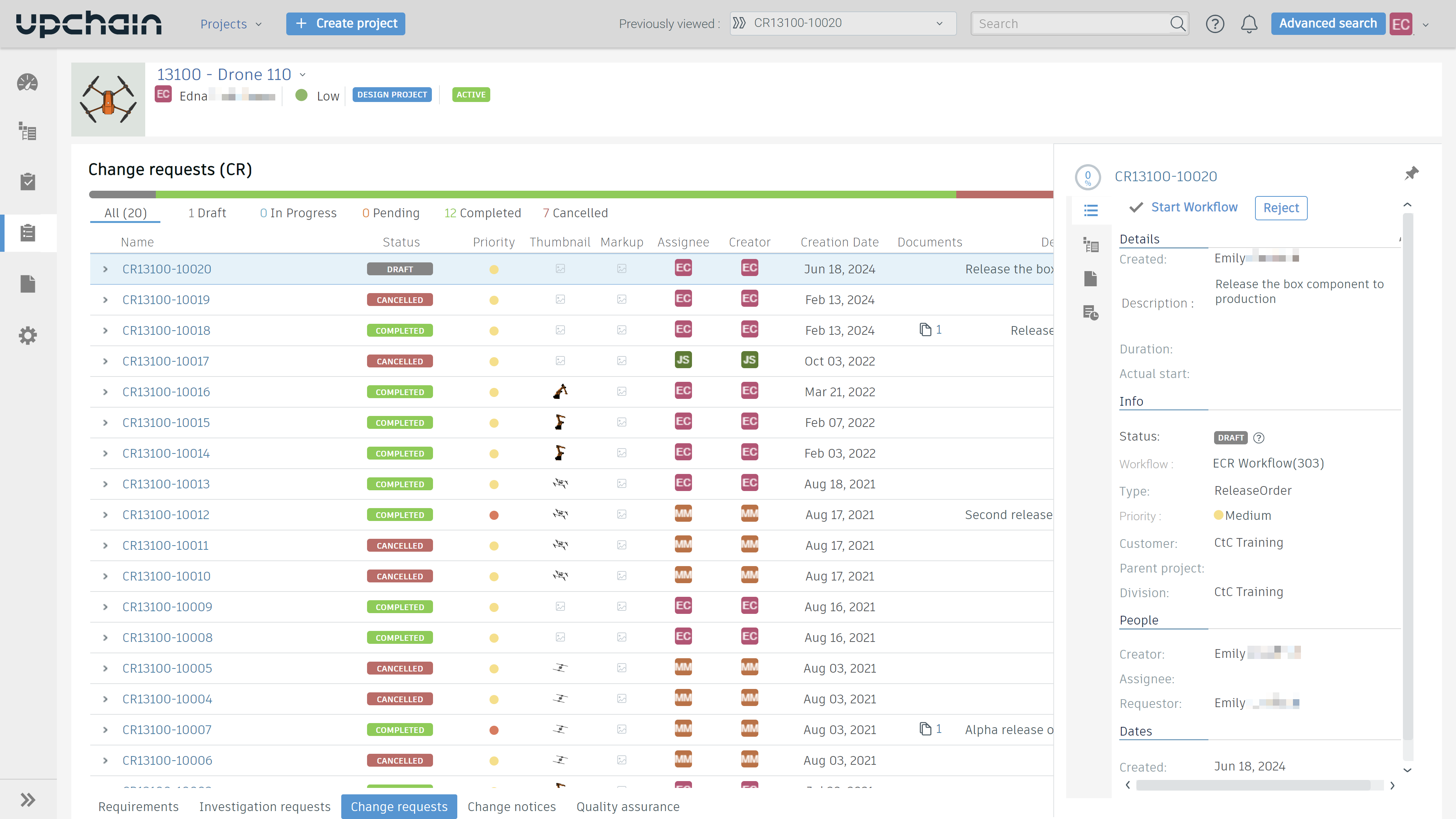
Filter change requests based on status
You may filter all CRs to show only those with a given status. To do this:
- Click a status at the top of the Change request dashboard.
All CRs that currently have the chosen status are shown.
Search for a change request
You may search for a CR by its name or description. To do this:
- Click the Quick search
 icon in the top-right corner of the dashboard.
 - Begin typing the CR's name or description.
The dashboard dynamically updates to display all CRs whose name or description matches what you've typed.
View a change request's details pane
Navigate to Business Processes > Change requests in a project.
Single-click on a CR to open its details view.
The CR details pane opens on the right side.
(Optional) To keep the CR details pane open, click
 .
.
The following table describes the tabs related to a selected CR:
| Tab | Description |
|---|---|
 Details Details |
The selected CR's details are displayed such as name, selected workflow, CR maturity (if applicable), priority start date, and duration. A newly selected CR always opens to this tab. If the CR is in progress, a button is displayed at the top of this window that progresses the workflow to the next step.
|
 Items Items |
The selected CR's associated items. Click Maximize  to see the item in the CR. to see the item in the CR. |
 Documents Documents |
Add a document to an item in the CR.
|
 Activities Activities |
See a list of sub-activities associated with the selected CR. Click Maximise to see all sub-activities associated with the CR. |
 > Add document.
View a CR's workflow history from the CR dashboard
On the Change request (CR) dashboard, click  beside the CR for which you want to see the composition of the initiated workflow.
The table displays the decision name, the role that performed the task or made the decision, assignee's initials, the initials of the one who completed the task or made the decision, the date when the action was completed, a short step description, the action taken, and any comments.
Open a CR
- Locate the CR you want to open.
- Double-click the CR.
More information about a CR in progress
Once you have started a CR workflow, you can see more information about the decisions and tasks that compose a CR.
- On the main Change request (CR) dashboard, click corresponding to a CR for which you want to see the details of an individual task or decision. This expands to show a table that lists decisions and tasks related to the CR.
- Click on a decision or task under to open its detail pane.
This table describes the tabs related to a CR's selected decision or task:
| Tab | Description |
|---|---|
 Details Details |
Quick overview about the selected decision or task. |
 Sub-Activities Sub-Activities |
If the selected decision or task has sub-activities, these are listed here. |
 Documents Documents |
Lists available folders. |
 History History |
History details all actions taken since the CR was created. |
 Notes Notes |
This tab displays activity-related comments, such as approval and rejection comments. |