Known Issues and Workarounds for Upchain 22.3
This topic describes known issues and workarounds in Upchain 22.3.
Known Issues
- After a Change notice (CN) workflow completes, the Full list view becomes disabled. And even though Upchain indicates that “There are resolved anomalies in orphan window.” you cannot review these since Full list is disabled. See the Workaround to reset the Full list button to active.
- Advanced search does not return any results when configured with the following filters, operators, and attributes:
| Filter | Operator | Attribute | Search operator |
|---|---|---|---|
| File | Match all > File Name | All search operators | |
| AND | |||
| Item Version | Match all > Item Number | All search operators | |
| Project | Match all > Project | All search operators |
OR,
| Filter | Operator | Attribute | Search operator |
|---|---|---|---|
| Item Version | Match all > Item Number | All search operators | |
| AND | |||
| File | Match all > File Name | All search operators | |
| Project | Match all > Project | All search operators |
There are no known workarounds for this issue.
Workarounds
Follow these steps to reset the Full list button to active:
- Copy and paste the URL for the completed Change notice (CN) into a new tab in your browser.
- Remove the following parameter
?isWorkflowComplete=truefrom the URL. - Press Enter.
Full list is now active for the completed CN.
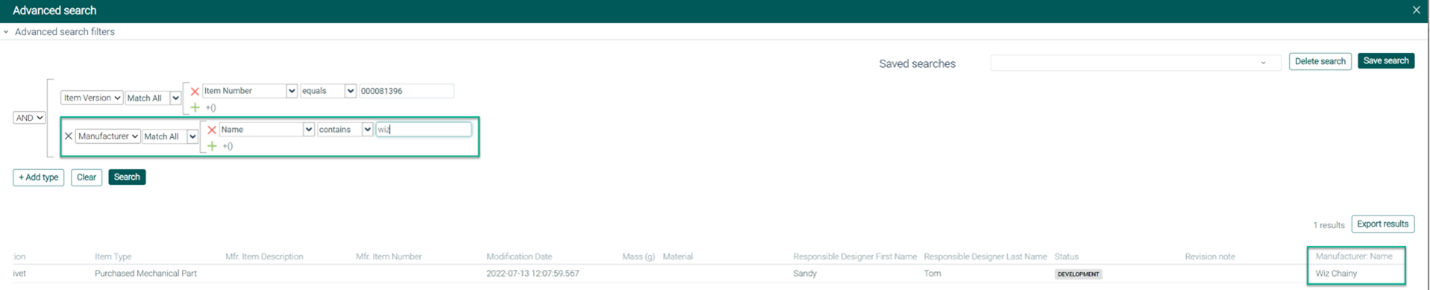
We removed Manufacturer Name as a column available for adding to the Advanced search results table. You can follow these steps so that manufacturer’s name does appear in the search results table:
Open Advanced search.
Configure one of the default search types: Item Version, File, Project, Customer, eBOM, CR, or CN.
Click + Add type.
Select Manufacturer from the drop-down list. The variable is automatically set to Name.
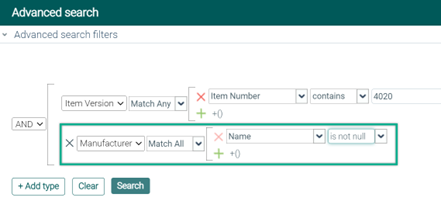
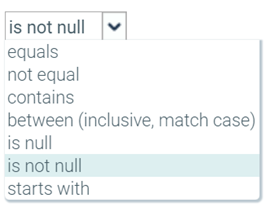
Select is not null from the operator drop-down list.
Click Search.
Manufacturer Name is available as a column in the search results table.