What's New in Upchain 21.3
Release date : August 2, 2021
Overview
This article describes What's New and Enhancements provided in the Upchain 21.3 major service update.
Upgrading the CAD Plugin
Users currently on a 21.1.x CAD Plugin are not required to update their plugin to continue using Upchain with v21.3 features and capability. However, it is strongly recommended that they upgrade their CAD plugin to receive the new capabilities of Upchain v21.3. Upchain CAD Connector v21.3 is available for download on the Plugins page immediately following the service update maintenance window.
What's New
Privacy Statement: Changes and updates
Upchain was acquired by Autodesk on May 12, 2021. Effective August 2, 2021, Autodesk’s Privacy Statement applies to Upchain offerings and sets forth how Autodesk may collect, use, and disclose personal data of or relating to you.
Users may review the Autodesk Privacy Statement from the Upchain sign in page while new Upchain users must review and acknowledge the Privacy Statement when registering.
Autodesk Integration: New process for inviting new users to Upchain tenant
As of 21.3 release, for all new Upchain tenants, users must have an Autodesk account and license. This will affect the process for creating user accounts, assigning licenses, and administering users in Upchain. This new process does not apply to existing tenants that were created prior to 21.3.
As a part of this new process, all users on a tenant that is created in Upchain 21.3 or later, must have the following in order to successfully sign in to Upchain:
- An Autodesk account,
- An Autodesk license for Upchain,
- Accept an invite to join an Upchain tenant, and
- A matching license in Upchain.
Users who receive an invitation to sign in to Upchain must do so using their Autodesk credentials.
About license types
Users must be assigned matching license types both with Autodesk and Upchain. The following table maps Upchain and Autodesk licenses:
| Upchain License | Autodesk Upchain |
|---|---|
| Upchain Professional | Upchain Professional |
| Upchain Team | Upchain Team |
| Upchain Participant | Upchain Participant |
| Upchain Viewer | Not Applicable |
New sign in page
Upchain has a new sign in page. The page has two, distinct sections, the top section allows existing customers to sign in to Upchain with their Upchain credentials and the bottom section allows new customers to sign in to Upchain with their Autodesk credentials.### Cad plugins: removal of oracle java from pre-requisites
After upgrading to the new version of the CAD Connector, the system checks for Java 8, and if it is not available, then downloads and installs Amazon Java Corretto 8.
User-data Management: Delete profile images
Upchain is enhanced to allow users, or Tenant Admins on a user’s behalf, to delete profile photos. This is in addition to the existing ability to remove contact information from Upchain. If Tenant Admins change a user’s status from ‘Active’ to ‘Inactive’ the profile photo is automatically deleted.
Users may delete their own profile photos.
Tenant Admins may delete any user’s profile photo from Administration > Users > user’s details pane.
When profile images are deleted, they are removed from all contexts such as the Project dashboard. View related API Enhancements.
Enhancements
BOM
- *When viewing linked items in the Item Details pane a mouse-over tooltip shows the linked item’s name and type without having to scroll horizontally.
- *Linking an item to another one in the Linked Items section of the Item Details tab now creates the link in both directions. In other words, when you link item A to item B, the link from item B to item A is also created automatically.
- *Users can now copy multiple items from one BOM and paste them into another BOM, as long as the destination item is still in development. The button to Copy to CR now reads Copy to CR/BOM.
- Fields related to ‘eBOM Version’ now display adjacent to the Item Details pane when this pane is pinned in place.
Business processes
- Change Requests (CRs) and Change Notices (CNs) selected from the ‘Previously Viewed’ field’s drop-down options directly opens the CR’s or CN’s details pane on the Business processes > CR/CN page rather than opening the list of all CRs or CNs created for the project.
View related API Enhancements.
CAD Plugins
The CAD Connector now supports the following CAD software releases:
- PTC CREO 6
- PTC CREO 7
- SolidWorks 2021
NX CAD Plugin users ran into the following error message when they are unable to log in to the NX CAD Plugin: ‘No connection could be made because the target machine actively refused it
<IP Address>:<Port no.>. This error message now reads as: ‘NX session is unreachable on local computer. Please see the Help Center article on Connection Error.’ The referenced Help Center article helps users resolve this issue.When Upchain services are disrupted for CAD Plugin users, a new error message instructs users to try again in five minutes for up to three times after which, they should contact their administrator or Support. The new error message replaces the following error message: ‘Call failed with status code 0’.
*There is now an option to display an item’s configuration name (if it has one) in most areas of the CAD plugin where items are shown, including cBOM, eBOM, and My Assignments. This is true for SolidWorks, AutoCAD, and toolbox part configuration items.
We have optimized a number of steps in the checkin process to make it more efficient for all CAD systems.
Main dashboard
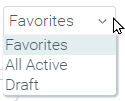
There is a new filter on the Projects section on the main dashboard to show projects that are still in a Draft state. This filter will only show Draft projects for the creator of those projects.
Sign in
- Inactive users attempting to sign in to Upchain receive the following more descriptive error message: ‘The account with which you have tried to log in is no longer active in Upchain. Please contact your Upchain administrator.’
API Enhancements
Administration
DELETE: /api/user/v2/{userId}profile-photo: A successful request returns a 204 HTTP response with an empty body and deletes the identified user’s profile photo.
Note: Only Support and Tenant Admins may delete any user’s profile photo. All other users may only use this endpoint to delete their own profile photos.
Business processes
- *
POST: /api/cr/v1/crs/{crId}/files: Tenant Admins may use this endpoint to attach a document that does not exist in Upchain to a Change Request (CR). The request body must contain the name of the file to be attached.
Note: This endpoint should not be used to link a document that already resides in Upchain.
Document Management System (DMS)
- *
POST: /api/dms/v1/documents/upload: This new endpoint adds teh DMS-document specified in the request body to the indicated parent node. The new endpoint consolidates the functions performed by the following endpoints:/api/dms/v1/document/prepare_initial_checkin/{documentName}/api/dms/v1/document/new_initial_checkin/api/services/vault/v1/files//upload-dms/api/dms/v1/document/{documentVersionId}/file_size
Reports
- *
POST: /api/bom/v1/BOM-report?{projectId}&{itemId}| | Endpoint includes the following enhancements:- Requires
itemIdas a request parameter in addition toprojectId. - The result file (a generated report in JSON format) includes an item’s
part_number-major_rev-minor-revin thefileNamefield. - When the
detailReportfield isTRUEthenebomPathsandcbomPathsfields are included in the response, and if FALSE then they are excluded from the response.
- Requires
Supplier
POST: /api/user/v2/suppliers: This endpoint creates suppliers for their tenants. The request returns a 409 HTTP response if either the supplier’s name and/or the MRP number are not unique to the tenant.