What's New in Upchain 22.1
Release date: January 24, 2022
Overview
This document describes the new features and enhancements provided in the Upchain 22.1 major service update.
In between major service updates, Upchain deploys weekly minor updates to address any critical issues reported by our customers. This document includes details of the changes introduced in the weekly updates, denoted by an asterisk(*).
Upgrading the CAD Plugin
You may upgrade your CAD Plugin to 22.1 to receive the newest capabilities. Upchain Web 22.1 is backward compatible with the CAD Plugin version 21.4.
The latest version of the Upchain CAD Connector is available for download on the Plugins page immediately following the service update made to the maintenance window.
What's New
Item representation: Optional inclusion of item description
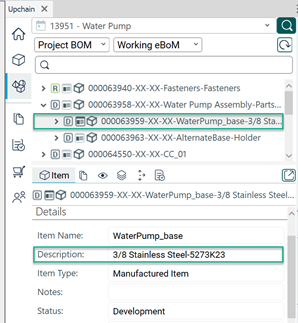
The item description may now be included wherever an item is displayed.
The Item description attribute can be added by Tenant Administrators under Plugin Settings  > Item representation.
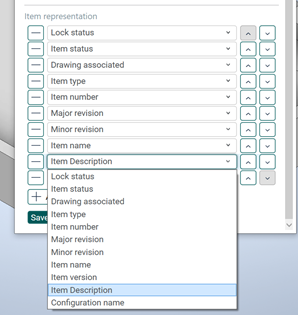
Once included, it is available everywhere in Upchain.
Upchain for Inventor: Enhancements
Support for Content Center and Customer Library files
Upchain CAD Plugin 22.1 for Inventor recognizes when an assembly includes Content Center and Library files (collectively referred to here as CC/Lib files). When an assembly with CC/Lib files is added to Upchain, the CC/Lib files are:
- Added as released items which effectively prevents them from being checked out and modified.
- In Upchain Web CC/Lib files keep their original name, as maintained in Inventor, so that Upchain recognizes other assemblies that reference the same CC/Lib files.
Support for writing common and custom attributes
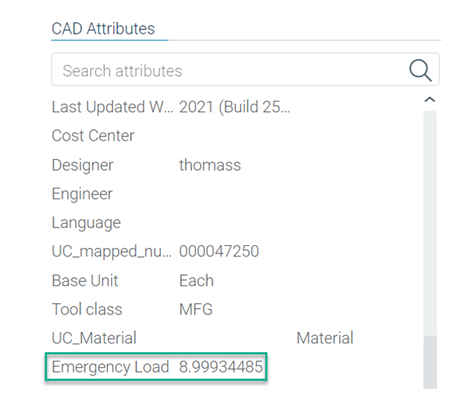
Upchain now supports writing common and custom attributes to Inventor files on checking out the item.
Tenant Administrators can map a new attribute or update an existing attribute to write. If this attribute is modified in Upchain Web then the next time the item is checked out in the Upchain CAD Plugin for Inventor, the attribute is updated to File > iProperties and the item details.
Upchain CAD Plugin for AutoCAD: Integrated UI
The Upchain CAD Plugin is now embedded in AutoCAD, AutoCAD Mechanical and AutoCAD Electrical for the following versions: 2019, 2020, 2021, and 2022. If required, the Upchain CAD Plugin may be accessed from Collaborate > Data Management.
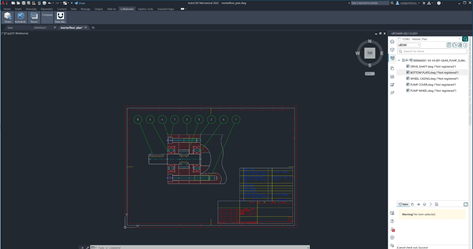
If required, the Upchain CAD Plugin may be accessed from Collaborate > Data Management.

Upchain CAD Plugin for AutoCAD (2019, 2020, 2021, and 2022) manages DWG drawings.
Tenant Administrator’s role: Available for assignment, reassignment or removal
When inviting users to a tenant, Tenant Administrators can assign the Tenant Administrator’s role.
The Tenant Administrator’s role may also be reassigned to an existing user on the tenant or removed from a user who was previously assigned the Tenant Administrator’s role.
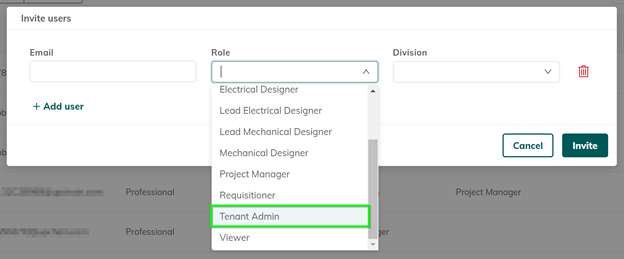
The Tenant Administrator’s role may also be reassigned to an existing user on the tenant or removed from a user who was previously assigned the Tenant Administrator’s role.
Until now only Autodesk Support could perform these operations related to the Tenant Administrator’s role.
View related API Enhancements.
Enhancements
Advanced Search
- The
containsoperator is now available when using the Categorization Attribute and Custom Attribute filters. Note: This enhancement is only available from Upchain Web and not when using the Advanced search feature from the CAD Plugin. - *A new operator
starts withis available both in Upchain Web and the CAD Plugin. - *When Item Version is the search criterion, Item number is selected by default instead of the Item name.
- *
key can also be used to return search results.
BOM
- Where used
 excludes listing records of items associated with promoted parents.
 - When the new
keep.supplier.infotenant property is enabled, and a released item is revisioned then the supplier’s details about the item are automatically added to the revisioned item. Prior to this change, only the item’s list of associated suppliers carried over when a released item is revisioned. Ifkeep.supplier.infois disabled then supplier’s details are excluded for revisioned items.
This change is applicable regardless of whether the new version is created for a released item from the CAD Plugin or Upchain Web. - Effective date has new and corrected eBOM calculations.
New eBOM calculations We added new eBOM calculations that apply under the following conditions when you configure effective date for a project:
| Conditions 1 | Result |
|---|---|
|
|
| Conditions 2 | Result |
|---|---|
|
eBOM structure includes the latest saved versions of all items, irrespective of the items’ creation date. Any structural changes made in Upchain Web are part of this eBOM. |
Corrections to existing eBOM calculations We corrected existing eBOM calculations that apply under the following conditions when you configure effective date for a project:
| Conditions 1 | Result |
|---|---|
|
In the eBOM structure:
|
| Conditions 2 | Result |
|---|---|
|
The eBOM structure includes the latest checked in versions of all items, irrespective of the items’ creation date. Newly created items that were checked in are also pulled into the eBOM structure. Note: Newer versions of items that are either Obsolete or Externally released are excluded - even if their creation date is within the project’s effective date. |
Business Processes
- *Business processes page opens to the Change Requests (CR) tab instead of the Requirements tab.
- *When viewing CNs and CRs, CN numbers, CR numbers and project numbers may be selected and copied (use Ctrl + C on Windows and Cmd + C on Mac) from the following points in the UI:
- Project name from the top pane on the Business processes page.
- CN/CR name from the details pane of a selected CR/CN.
- CN/CR name and project name from the top pane of an open CR/CN.
- A CR workflow does not start now unless the items listed in the CR are found in the vault. A new error message lists the missing items.
CAD Plugin
- *Upchain CAD Plugin now extends full support for managing BOMs, drawings, configurations, and attributes for the following CAD softwares:
- CATIA 2020 and 2021,
- NX 1953 and 1980, and
- Creo 8.
- *The drop-down list for the ‘Manufacturers’ field is listed alphabetically in the item details pane. This change also applies to Upchain Web.
Supplier Viewer
- The Home button is relabeled to Reset in the 3D Viewer. When you click Reset, the CAD model returns to its original orientation.
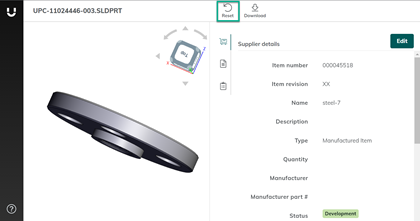
- Documents listed in the Supplier Viewer are no longer clickable. This effectively prevents suppliers from attempting to open a document from within the viewer. Suppliers are required to download the document in order to view documents associated with their assignment.
API Enhancements
Users
- In the request body for
POST /api/user/v1/invite_userendpoint,roleNamenow acceptsTenant Adminas a value. A successful invite returns a 200 http response code. - In the
PUT /api/user/v1/{userId}endpoint,roleNamefield now accepts Tenant Admin as a value. This endpoint can be used to:- Reassign a user’s role to Tenant Administrator, or
- Remove the Tenant Administrator’s role from a user.