UX Enhancements
This document describes enhancements in Upchain 22.2. Changes that were a part of weekly updates are flagged by an asterisk(*).
Administration
- *When Tenant Administrators access Engineering > Item numbering or Document numbering, they are taken directly to the Published tab, instead of the All tab. This provides direct visibility to all rules currently in use on your tenant.
BOM
- *The tooltip that provides more information about a locked item no longer completely covers the locked item so that it cannot be selected. A small gap is introduced between the tooltip and the start of the item’s number so that the item can be selected without having to wait for the tooltip to disappear.
- *The end-item panel’s width can be resized by dragging the right-side of the gray bounding box - in or out.
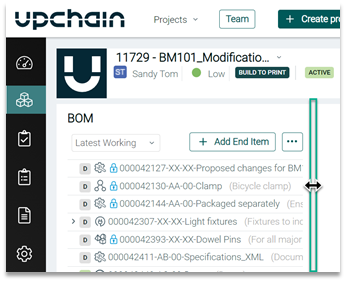
- When you select an end-item and click on the arrow buttons
 , the selected end-item’s eBOM table fills the BOM page.
 - The item details panel width can be expanded, up to one-third of the width of the BOM page, by dragging the left-side of the gray bounding box - in or out.
Note: Sub-sections within the item details pane cannot be independently expanded or contracted, such as the Documents and Specification documents under Documents.
Business Processes
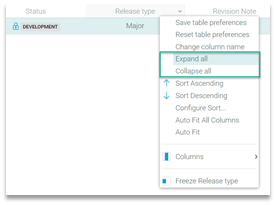
*Change requests (CRs) and Change notices (CNs) have new Expand All and Collapse All options available when you right-click on any column heading.
- Expand all shows all parts, assemblies, subassemblies in a CR or CN.
- Collapse all shows only end-items or the top-levels of assemblies.
- When editing a CN, all assemblies, subassemblies, and parts are all fully expanded and displayed by default. This eliminates the requirement to expand individual assemblies or subassemblies to see the items within them.
CAD Plugin
- *You can now flag up to 50 items as Favorite. These will be listed on the Upchain dashboard under My Favorite Items. This has increased from 5.
General
- Monetary values are right-aligned when listed in the following tabular views:
- Cost in the BOM > eBOM.
- Extended Cost in a CN’s details page.
- Total Cost in the Project management-type dashboard accessed from Project Dashboard
 .
.
- Cost in the BOM > eBOM.
Projects
- If the search term entered in Projects > Search for project… returns a single search result then pressing Enter, on your keyboard, opens the project’s dashboard view.
Project Settings
- *You can now flag up to 50 projects as a Favorite. These will be listed on the Upchain dashboard under Projects. This has increased from 13.