Sign into Desktop Connector
- Windows®
- Go to Start
 Autodesk Desktop Connector.
- Right-click on the Desktop Connector tray icon
 and select Sign in.
- On the Autodesk-Sign In screen, enter your Autodesk credentials and click Sign In.
- Go to Start
- macOS®
- Go to the Launchpad and click Autodesk Desktop Connector.
- Click on the Desktop Connector icon
in the menu bar and select Sign in.
- On the Autodesk-Sign In screen, enter your Autodesk credentials and click Sign In.
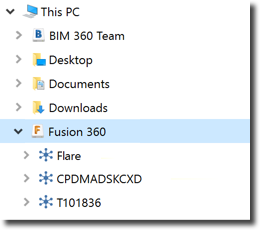
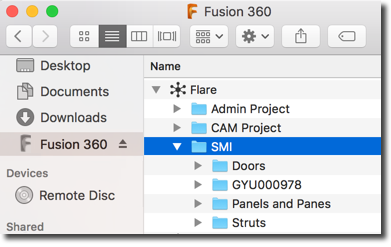
A connected drive is created for each supported data source associated with your Autodesk credentials. The data source's icon is used to represent the associated connected drive (such as
 for Fusion 360).
|
Windows® |
macOS® |
|---|---|
 |
 |
Sign Out of Desktop Connector (All Platforms)
- Windows®–Right-click on the Desktop Connector icon
or the connected drive and select Sign Out to disconnect your connected drives.
macOS®–Click the Desktop Connector icon
in the menu bar and select Sign Out to disconnect your connected drives.