
Issue:
When starting AutoCAD products, or its vertical products such as Advance Steel, the properties palette is missing
- Commands that are supposed to bring it up, don't fix it.
- It can't be found on screen, off screen, or behind other windows.
- Executing command shows "properties" and "properties close" in command line, but the palette does not appear anywhere.
Solution:
Edit palette in the CUI editor
1. Enter CUI on the command line.
2. Select your workspace on the left.
3. Click Customize Workspace on the right.
4. Expand Palettes and select Properties.
5. Change the appearance settings to:
- Show: Yes
- Orientation: Floating
- Allow Docking: No
- Auto Hide: Off
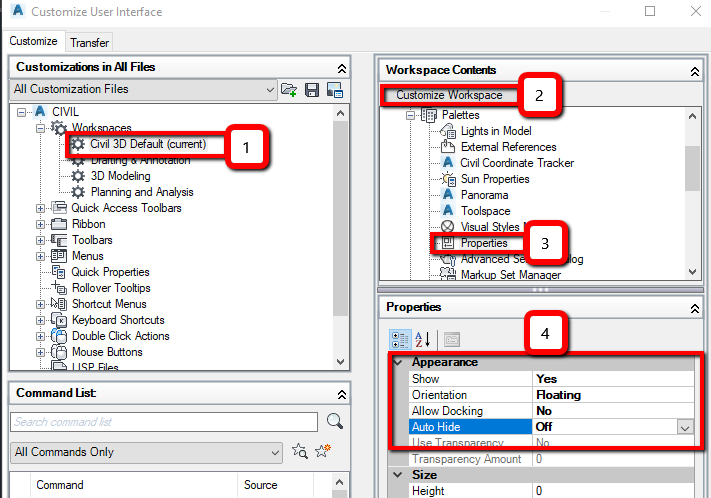
6. Click Done and then click OK.
Reset the product to defaults
- For AutoCAD (see: How to reset AutoCAD to defaults).
- For Civil 3D (see: How to reset Civil 3D to defaults).
- For AutoCAD Plant 3D (see: How to reset AutoCAD Plant 3D to defaults).
Update AutoCAD to the latest version
For AutoCAD, see the article: Update Autodesk software | Individuals | Autodesk Support