
Use this procedure to add a gable to the roof line of a curtain wall. You can also add a gable on the Roof/Floor Line worksheet on the Properties palette.
Note: This option is available only if the roof line has not been edited. After the roof line changes, you cannot add a gable using this option.
- Select the curtain wall, and click
 .
.  A temporary profile is created for you to edit the geometry of the Roof line.
 - Click .
 If Add Gable cannot be selected, the roof line was previously edited.
 - Select the roof line.
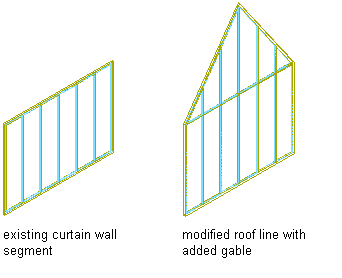
Modifying a curtain wall roof line by adding a gable
A third vertex is added to the roof line halfway between the two ends of the roof line.
- Continue editing the roof line or the floor line, if needed.
- Save or discard the changes:
If you want to … Then … restore the roof line and the floor line to their shape before editing click . 
save the changes click . 