
Issue:
Where to download Civil 3D extensions such as:
Autodesk Storm and Sanitary Analysis 202x
Standardized Data Tool for Civil 3D 202x
IFC 4.3 Extension Update 1 for Autodesk Civil 3D 202x
Civil Engineering Data Translator
CPIXML Extension 202x for Autodesk Civil 3D
Infrastructure Parts Editor 202x
Rail Data Exchange Extension 202x for Autodesk Civil 3D
InfoWorks ICM Import and Export Plug-in 202x for Autodesk Civil 3D
GENIO Import and Export Extension 202x for Autodesk Civil 3D
Data Extension for 12d 202x for Autodesk Civil 3D
Coordinates Transformation Tool 202x for Autodesk Civil 3D
PPK Survey Extension 202x for Autodesk Civil 3D
SHP Import and Export Utility 202x for Autodesk Civil 3D
Geotechnical Modeler Extension 202x for Autodesk Civil 3D
AutoCAD 202x VBA Extension
Grading Optimization for Civil 3D 202x
Inventor Infrastructure Modeler Plugin 202x
Note: version may differ.
Solution:
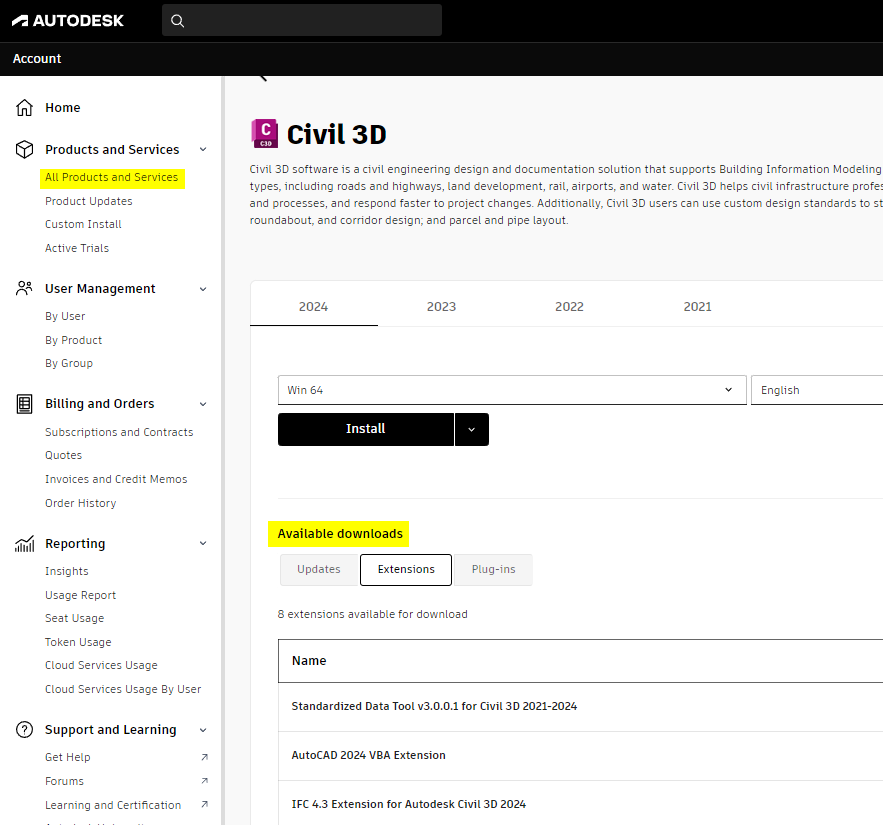
Civil 3D extensions can be downloaded from the Autodesk Account:
On the left pane, click All Product and Service.
Select Civil 3D.
Select the Version and download category (Extensions or Plug-ins).
Note:
Product updates can be installed from the Autodesk Access App. Product extensions and Plug-ins are available for download in the Autodesk Account online only.