
About Autodesk Assistant in Inventor
What's New: 2027
Autodesk Assistant is an add-in and is loaded when you click to activate it using one of the access methods below.
Access
At the top of the Inventor window, on the right side of the Application bar, click Autodesk Assistant.

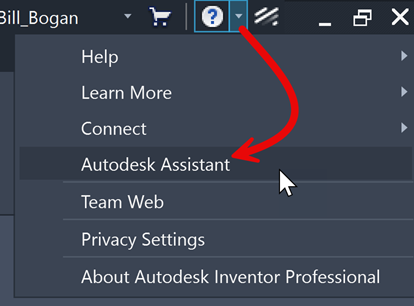
In the application bar, from the help menu, select Autodesk Assistant.
The Assistant panel displays docked to the right side of the canvas and remains available as you work. The available tabs are:
 Prompt tab, enter new prompts for the current assistant chat session. To enable prompts read and agree to the Terms of Use and Privacy Statement.
 Saved Prompts tab, displays a list of saved prompts.
 Displays a list of prompts you have used.
 Displays the Autodesk Assistant settings where you can manage the Tech Preview.
- Tech Preview button displays information and contains links to Help content and Feedback options.
 New Chat, starts a new Assistant chat session.
 Advanced Settings provides access to Help.
To close the panel, click the X on the tab at the top of the Autodesk Assistant panel.
Tech Preview in Inventor
Autodesk Assistant is an AI assistant that helps you work with Autodesk Inventor through natural conversation and intelligent automation - I can analyze, query, and modify Inventor files, components, and settings while also providing access to official Autodesk help documentation and tutorials.
With the Autodesk Assistant you can:
- Work with your CAD model: Query design properties, show or hide components, and modify dimensions.
- Generate AI visualizations: Create render-like visuals from your design by describing materials, lighting, and environments.
For a complete overview of my capabilities, try asking "What tools are available?" or "Show me some example prompts" to see detailed examples of what I can help you accomplish.
To manage your Tech Preview setting, see How to use Autodesk Assistant.