
Issue:
Unable to import IFC to Revit.Solution:
Link IFC instead of Open
- Install:
- For Revit 2019 install IFC2019 before linking.
- For Revit 2020 install IFC2020 before linking.
- For Revit 2021 install IFC2021 before linking.
- For Revit 2022 install IFC2022 before linking.
- For Revit 2023 install IFC2023 before linking.
- For Revit 2024 install IFC2024 before linking.
- For Revit 2025 install IFC2025 before linking.
- For Revit 2026 install IFC2026 before linking
- Clean windows temp folder (make sure to have at least 5-GB or 10-GB free disk space after cleaning on the drive. Where temp folder is located): How to delete temporary files in Windows.
- Update Revit with the latest available update: How to tie the Build number with the Revit update.
- Set template for IFC import How to set template for IFC import in Revit.
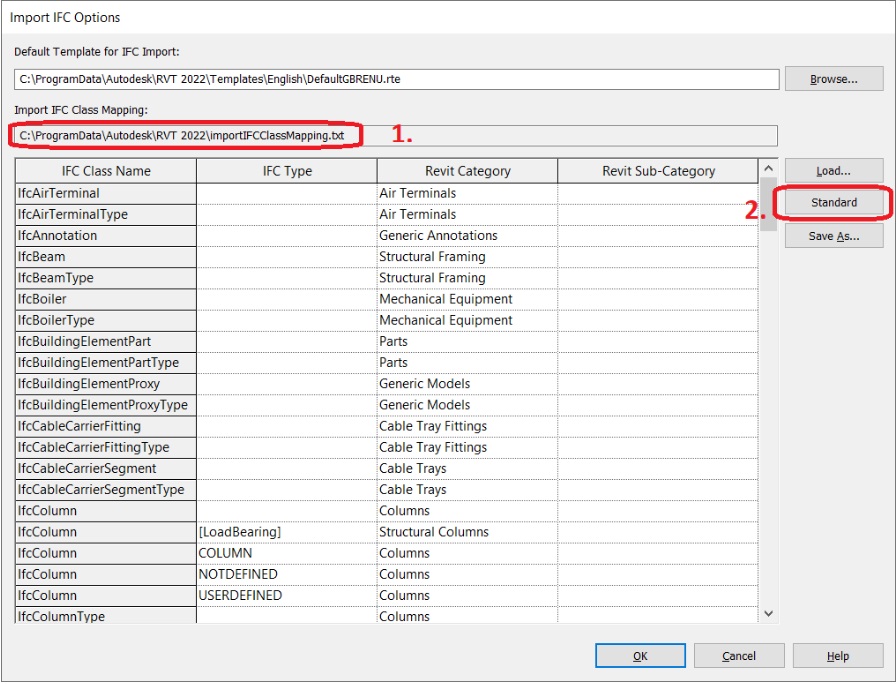
- Restore class mapping file:
a. Rename the file displayed in field (1) on the window from the screenshot.
b. Press Standard button (2).
- Link IFC