
Issue:
When trying to insert a mesh in Fusion 360, there is no option for it in the Insert menu.Environment:
This article applies to the operating systems listed. If your operating system is not shown, it may be because it is not supported or because support information is not yet available. For details on operating systems no longer supported by the vendor, see Product Support Lifecycle.Solution:
Most of the time this is because Fusion is in a parametric modeling environment (timeline enabled), when it needs to be in direct modeling (timeline disabled) for inserting and working with meshes. There a few ways to achieve this:- Right-click the top-level component in the Browser Tree and select "Do Not Capture Design History"
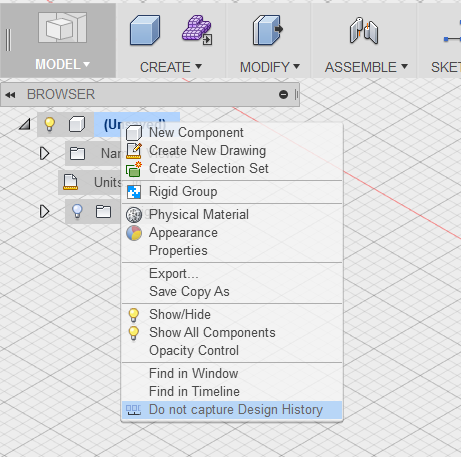
- In the create menu, select Create Form. This automatically puts you in the sculpt environment which is Direct Modeling. From here, the option to insert a mesh will now appear in the insert menu
- In the create menu, select Create Base Feature. The base feature will turn off the parametric history for what you are modeling until you select Finish Base Feature. This way you can still work with a timeline, but be able to manipulate a mesh for example.