
Issue:
Problem opening a SOLIDWORKS .SLDASM" file or AnyCAD file in Fusion 360.- The file/ assembly is fully viewed in online viewer
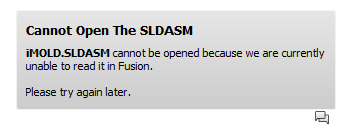
- When attempting to open an SLDASM file (SOLIDWORKS format) uploaded with the browser for use with AnyCAD in Fusion 360, an error occurs:
Cannot Open the SLDASM
<FILENAME>.SLDASM cannot be opened because we are currently unable to read it in Fusion.
Please try again later.
Environment:
This article applies to the operating systems listed. If your operating system is not shown, it may be because it is not supported or because support information is not yet available. For details on operating systems no longer supported by the vendor, see Product Support Lifecycle.Solution:
Use one the following options to open a SOLIDWORKS .SLDASM" file or AnyCAD file in Fusion 360:
Option 1.
- Right click the SLASM file from the Data Panel.
- Click Create Fusion Design.
Option 2.
- Click 'Upload' in the Data Panel.
- Select file to upload.
- Upload.