
Issue:
How to check for Autodesk Fusion updates.
- Does Fusion need to be manually updated?
- Has Fusion automatically updated to the newest version?
- Where can the newest version of Fusion be found?
Solution:
Note:
- Fusion updates are downloaded and installed automatically. Autodesk Access or AdODIS are not used to update Fusion.
- A hotfix update will not change the version number of a regular update.
Verify the version installed is the most recent version of Fusion
- Check which version is installed on the system: How to check which version of Fusion is being used.
- Find the recent version release: How to check what the current build release is for Fusion?
- If the versions do not match, update Fusion.
To check for pending updates
- Connect to the internet and start Fusion.
- In the top right, select Job Status (the clock icon). Make sure that Fusion is in online mode. Fusion will not update in offline mode.
- A "1" displays in the Job Status when an update is available.
- After the download is complete, there will be a message that says:
A new version of Fusion 360 has landed. When you're ready, restart to get the latest goods.
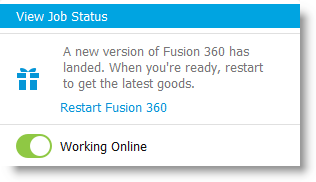
- You may be prompted to restart Fusion. Select Restart Fusion to finalize the Update.
Note: Updates are applied in the background while Fusion is running. During this time, a progress message is seen in the top-left corner: Downloading Update - x% Complete.
Select the "Check for update"
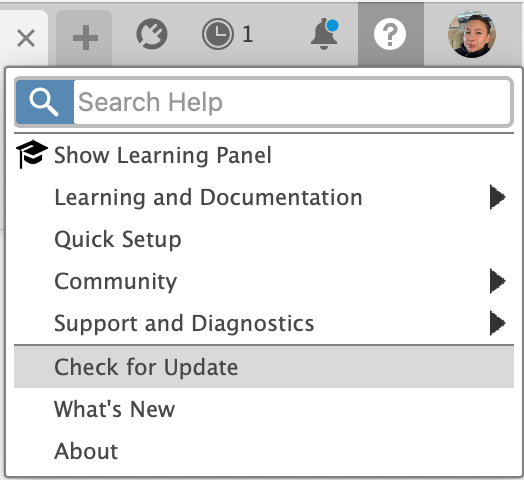
- Select the question mark icon in the top right corner.
- Find the "Check for Update" option:
- If "Check for Update" is not an option, you are on an outdated version of Fusion.
- If "Check for Update" is available, select it to check if Fusion is up to date.
If you have confirmed you are on an outdated version of Fusion and would like to update, work through the article How to update Fusion