
How to create a 2D drawing from a design in Autodesk Fusion that can be printed or exported. Where is the tool for creating a drawing in the program?
Follow the steps to create a 2D drawing from a design:
- Open the design.
- From the environment menu select Drawing then from Design.
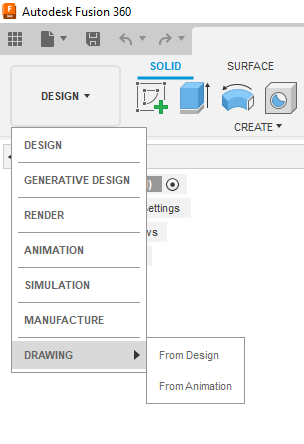
- Select options in the Create Drawing dialog box.
- The drawing file can be created from a full assembly or individual components/bodies.
- Select the appropriate drawing, template, standard, units, and sheet size options.

- Use tools in the drawing workspace to place views and annotations in the drawing workspace.
Note: For sketches and surfaces it may be necessary to select the top view in Appearance.
- To Print or export the drawing, choose one of these methods:
- Select File > Print and choose the preferred output format.
- Select the OUTPUT drop-down on the toolbar ribbon and select the preferred output format.
