How to start the Fusion Service Utility for Autodesk Fusion
The Fusion Service Utility is invoked automatically when two consecutive start failures are detected. Other methods to invoke the Service Utility include:
Start the Fusion Service Utility from Fusion
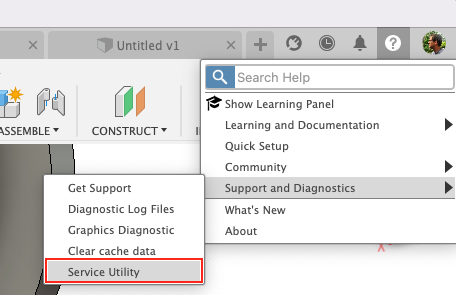
Click here - The Service Utility may be manually invoked in-product from the Help > Support and Diagnostics > Service Utility command
Start the Fusion Service Utility if Fusion cannot be accessed
Click here - Open the Service Utility on Windows
Use one of the following methods:
- Open the Service Utility from the programs list:
- Open Settings from the Windows Start Menu.
- Go to Apps > Installed Apps
- Find Autodesk Fusion from the list and select the three dots to the right.
- Select Modify to open the Service Utility.

- Start the Fusion executable (Fusion 360.exe) with line command -Service Util from the Command prompt or by editing shortcut.
Click here - Open the Service Utility on macOS
Use one of the following methods:
- Open the Service Utility from the following file path: Mac Drive>Users>[Username]>Applications>Autodesk Fusion Service Utility
- Open the Service Utility from Launchpad application
- Open the Launchpad application
through the icon or by selecting the F4 key and searching for it.
- Find Autodesk Fusion Service Utility and open it
- Open the Launchpad application