
Issue:
Files will no longer open or upload in Fusion. The program struggles to update.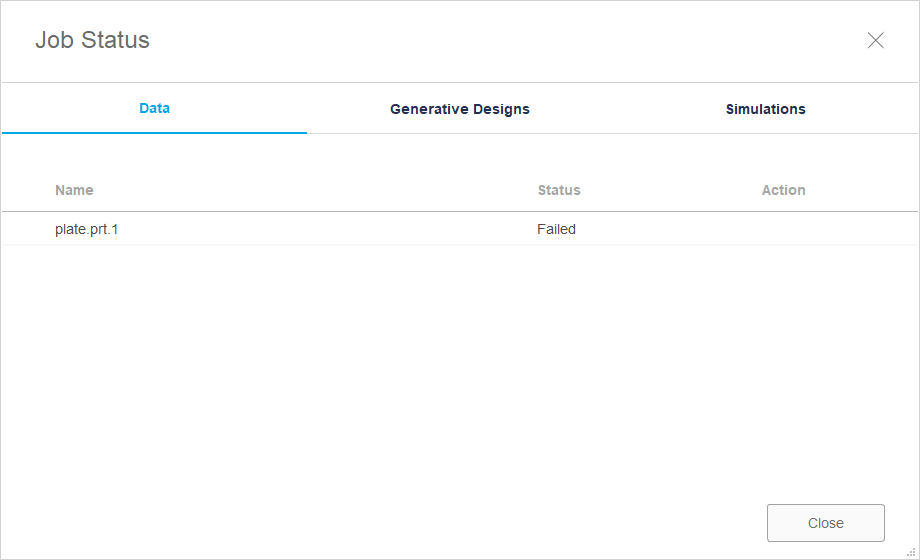
Environment:
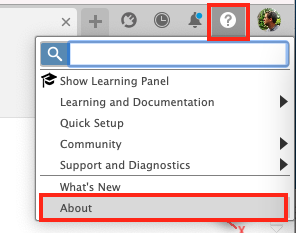
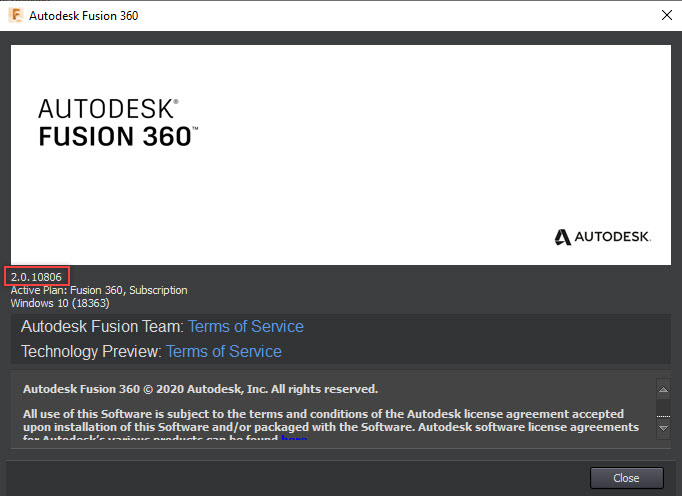
This issue affects Windows PCs only.Fusion 360 build numbers:
- 2.0.10806
- 2.0.10811
- 2.0.10813
Causes:
Windows customers on Fusion 360 version 2.0.10806 will not see live update to 2.0.10811. If they reinstall they will move to 2.0.10811 but that build also has the updating problem.Solution:
Manually update with the Fusion 360 Service Utility:
For Windows customers on Fusion 360 versions previous to 2.0.10806, their Fusion 360 will live update without any issues.- Hold Ctrl + SHIFT before starting Fusion 360, then start Fusion 360 until the Service Utility shows up.
- Open the Service Utility from the programs list:
- Open Programs and Features from the Windows Start Menu.
- Click Add/remove program.
- Select Fusion 360 from the list.
- Click Change. The Service Utility will open.
- Click Repair Fusion 360.
Manually reinstall:
For Windows customers on Fusion 360 version 2.0.10806 or 2.0.1081, they will need to manually reinstall (they don't need to uninstall) to the latest version.- Go to Autodesk | 3D Design, Engineering & Construction Software (http://www.autodesk.com).
- Sign in to Autodesk Account if not already signed in.
- Click the profile bubble in the upper right corner.
- Select "Products and Services" under the "My Account" tab in the drop-down.
- When the Products and Services page opens click the "Download Now" button to the right of the Fusion 360 product.
- This will open a new page and begin automatically downloading the latest installer after a few moments.
- Once the installer is downloaded, make sure that Fusion 360 is closed down. If it is not shut down yet, make sure that any open files are saved and synced to the cloud before shutting down Fusion 360 completely.
- Double-click on the installer and let it run.
- Once the installer is complete, sign in to Fusion 360 and check to see that the version number is past 2.0.10806 and 2.0.1081x. Also if the customer was complaining about files not opening then it is a good idea to now check that the files will now open again.