
Plans, advanced capabilities, and tokens
In Fusion, use the Purchase Manager to purchase Fusion plans, advanced capabilities, and Flex tokens.
- Plans are paid subscriptions for ongoing, full access to Fusion. Purchase a plan when your current access is limited or expiring and you want full Fusion functionality, or when you need to add subscriptions for other members of your team.
- Advanced capabilities extend your core Fusion experience. They include Fusion extensions and Fusion Manage.
- Flex tokens are a virtual currency you use in Fusion for cloud computational services, daily extension access, and pay-as-you-go access to Fusion and other Autodesk products.
Open the Purchase Manager
On the Application bar, click Extensions  to open the Purchase Manager:

The Purchase Manager opens with the Advanced Capabilities tab selected.
The Application bar may include additional access points. If you are on a Fusion trial, click See Plans and Pricing. If you use Fusion for personal use, click Upgrade  . Both open the Purchase Manager with the Plans and Pricing tab selected.
Purchase a Fusion subscription
Open the Purchase Manager.
Select the Plans and Pricing tab.
Note: The plans and options shown on this tab can vary depending on your Fusion access.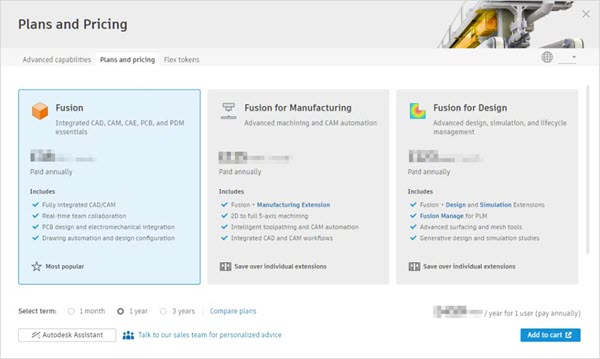
Click to select the plan you want.
Next to Select Term, select 1 Month, 1 Year, or 3 Years.
Click Add to Cart.
A shopping cart is displayed in your default Internet browser.
Follow the on-screen instructions to edit your cart, sign into your Autodesk account, and enter your payment details.
Click Submit Order.
Advanced capabilities and Flex tokens
Use the Advanced Capabilities and Flex Tokens tabs in the Purchase Manager for other purchases. For step-by-step instructions, see:
Bring Your Own Subscription (BYOS)
Bring Your Own Subscription (BYOS) is a policy that defines access to Fusion, as well as some other Autodesk products.
Fusion administrators are responsible for setting up a hub for collaboration.
While Fusion contract managers can assign and manage individuals' access to subscriptions, Fusion hub administrators have the ability to invite people to a hub without needing to assign a subscription.
If a person without an active Fusion subscription accepts an invitation to join a hub, they'll start a free 30-day trial, (starting once they first access Fusion) unless previously used.
If a person is invited to a hub and already has a Fusion subscription, they can start using the hub:
- Regardless of the individual or business entity that owns the Fusion hub.
- Regardless of which individual or business entity has purchased the subscription to Fusion (subject to conformance with the "Authorized User" definition and other conditions in the Autodesk Terms of Use).
- Regardless of the location of the data center on which the site is hosted (Europe, for example).
For more information on BYOS and Fusion, see the Subscriptions & Other Offerings page.