Open the Align option window to choose the continuity level, skewed or aligned edges, and options for part alignment and blending extra CV rows.
Using the Edge option when aligning natural surface edges allows free movement of the CVs.
Follow the prompts to first select the edge of the surface to be modified and then the reference edge to be matched to.
Manipulator arrows appear on the Hulls. Use these to interactively adjust the CVs while maintaining continuity.
In this example, G2 Curvature continuity has been specified.
-
Select input (connection edge), which is the top surface in this example.
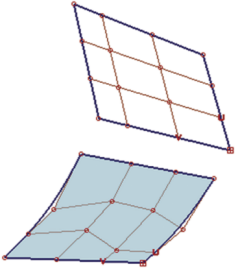
-
Select Master (reference edge), which is the bottom surface.
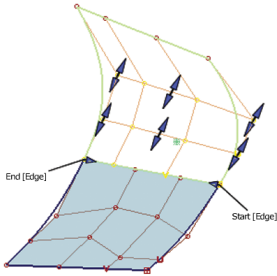
- Adjust the G1 and G2 CV rows with the arrows.