管理员可以自定义 AutoCAD 配置文件中的特性,以便 AutoCAD DWG 特性自动与 Vault 特性保持同步。
DWG 特性的同步由名为 SyncDWGProperty 的 PropertyDefinition 属性决定。该属性定义了是同步 DWG 特性还是使用在“Data Standard”对话框中输入的值创建 DWG 特性。
DWG 特性是在 C:\ProgramData\Autodesk\Vault 2015\Extensions\DataStandard\CAD\Configuration\AutoCAD.cfg 中进行定义的。
注: 有关特性定义和 AutoCAD 配置文件的详细信息,请参见为 Data Standard 修改 CAD 配置文件。
SyncDWGProperty 属性
SyncDWGProperty 属性是布尔型属性,可与大多数标准 DWG 特性结合使用。
<?xml version="1.0" encoding="utf-8"?>
<Configuration>
  <PathDefinition>{Workspace}\{Prop[Folder].Value}</PathDefinition>
  <FileNameDefinition>{Prop[GEN-TITLE-NR].Value}</FileNameDefinition>
  <PropertyDefinitions>
    <PropertyDefinition PropertyName="GEN-TITLE-NR" DataType="Text" InitialValue="{PathAndFileNameHandler.FileName}" />
    <PropertyDefinition PropertyName="GEN-TITLE-DES1" DataType="Text" RequiresValue="true" />
    <PropertyDefinition PropertyName="GEN-TITLE-DES2" DataType="Text" />
    <PropertyDefinition PropertyName="Folder" DataType="Text" InitialValue="Assemblies" RequiresValue="true"/>
    <PropertyDefinition PropertyName="Comments" DataType="Text" SyncDWGProperty="true"/>
  </PropertyDefinitions>
  <TitleBlock>ISO_TITLEA</TitleBlock>
</Configuration>
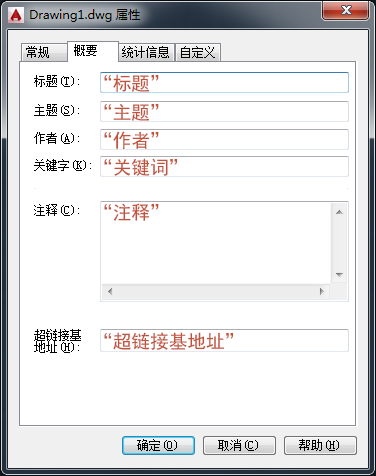
标准 DWG 特性
- "Title"
- "Subject"
- "Author"
- "Keywords"
- "Comments"(请参见前面的代码示例)
- "Hyperlink Base"
- "Revision Number"
注: 这些特性名称不区分大小写。
不能将 DWG 特性映射到同名的自定义特性。
如果 Data Standard 数据表中使用了这些特性,“Data Standard”对话框中将会显示相应的值。
行为
- 如果特性定义中不存在 SyncDWGProperty 属性或者 SyncDWGProperty 属性被设置为 false,则不会同步 DWG 特性。
- 如果 SyncDWGProperty 属性被设置为 true:
- 如果该名称的 DWG 特性不存在,则会创建此特性并将特性值设置为在“Data Standard”对话框中输入的值。
- 如果该名称的 DWG 特性已存在,则会使用在“Data Standard”对话框中输入的值替代此特性值。
- 如果已定义的特性与匹配的块属性保持同步,则该特性同样会与 DWG 特性保持同步。
- “Data Standard”对话框处于显示状态时(例如“编辑数据表”),将显示当前的 DWG 特性。