默认情况下,新的 Data Standard 功能会在 Vault 中的 $\Templates 文件夹中查找文档模板。此路径可在 Data Standard XAML 文件中修改。管理员还可以选择为不同的应用程序指定单独的模板文件夹(例如,为 AutoCAD 模板指定一个文件夹,为 Inventor 模板指定另一个文件夹)。
工作方式
Data Standard 的默认“新建文件”对话框含有一个名为“文档类型”的组合框。
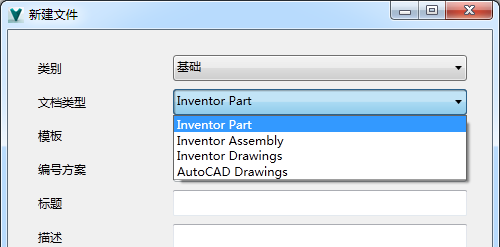
当用户从“文档类型”列表中选择一个选项并单击“确定”时,“新建 Data Standard 文件”功能会在与该文档类型关联的 Vault 文件夹路径中查找模板。该模板用于生成新文件。
配置“新建标准文件”对话框的模板路径
通过修改 Data Standard XAML 文件的以下部分,您可以指定 Vault 中的不同模板路径。
<?xml version="1.0" encoding="utf-8"?>
<WPF:MainWindow xmlns="http://schemas.microsoft.com/winfx/2006/xaml/presentation" xmlns:x="http://schemas.microsoft.com/winfx/2006/xaml" x:Name="MainWindow" xmlns:WPF="clr-namespace:CreateObject.WPF;assembly=CreateObject" AllowsTransparency="False" Background="#F0F0F0" MinWidth="500" MinHeight="518" MaxHeight="518">
    <Window.Resources>
        <!------------------------------------------------------------------------------------------------->
        <!-- This XmlDataProvider is used for defining Name/TemplatePath pairs that are used in the combo box "Document Type" and can be easily extended -->
        <XmlDataProvider x:Key="DocTypes"
                         XPath="/DocTypeData">
            <x:XData>
                <DocTypeData xmlns="">
                    <DocTypeInfo>
                        <Name>Inventor Part</Name>
                        <TemplatePath>$\Templates\Inventor\IPT</TemplatePath>
                    </DocTypeInfo>
                    <DocTypeInfo>
                        <Name>Inventor Assembly</Name>
                        <TemplatePath>$\Templates\Inventor\IAM</TemplatePath>
                    </DocTypeInfo>
                    <DocTypeInfo>
                        <Name>Inventor Drawings</Name>
                        <TemplatePath>$\Templates\Inventor\IDW</TemplatePath>
                    </DocTypeInfo>
                    <DocTypeInfo>
                        <Name>AutoCAD Drawings</Name>
                        <TemplatePath>$\Templates\AutoCAD</TemplatePath>
                    </DocTypeInfo>
                </DocTypeData>
            </x:XData>
        </XmlDataProvider>
        <!------------------------------------------------------------------------------------------------->
        ...
元素 <Name> 定义了“新建文件”对话框上的组合框中显示的值。元素 <TemplatePath> 对于用户是不可见的,用于设置视图模型内的 "TemplatePath"。
组合框“文档类型”如下所示:
...
<Label Content="Document Type" Grid.Row="2" Grid.Column="0" />
<ComboBox ItemsSource="{Binding Source={StaticResource DocTypes}, XPath=DocTypeInfo}"
          Name="DocTypeCombo"
          Grid.Row="2"
          Grid.Column="1"
          IsEnabled="{Binding IsNewEntryDialog}"
          DisplayMemberPath="Name"
          SelectedValuePath="TemplatePath"
          SelectedValue="{Binding TemplatePath}"
          SelectedIndex="0"></ComboBox>
...
属性 DisplayMemberPath 定义了数据源中的哪个元素将用于在组合框中显示。在本示例中,它被设置为 "Name"。
属性 SelectedValuePath 定义了数据源 ("TemplatePath") 中的哪个元素将被设置为要使用的模板路径值。
属性 SelectedValue="{Binding TemplatePath}" 设定了视图模型中的选定模板路径。必须将新的绑定特性 "TemplatePath" 添加到视图模型中。