Use this option to define the wire fabric in a cross section (of a wire fabric shape) of an RC structure element. There are several ways to access this option:
- Menu: Reinforcement > Wire fabrics in cross section
- Ribbon: ASD - Reinforcement > Reinforcement - definition > Wire fabrics in cross section
- Toolbar: Definition - wire fabrics > Wire fabrics in cross section

- Command line: RBCR_DEF_NET_SIDE.
After selecting the Wire fabrics in cross section option, the following dialog displays:
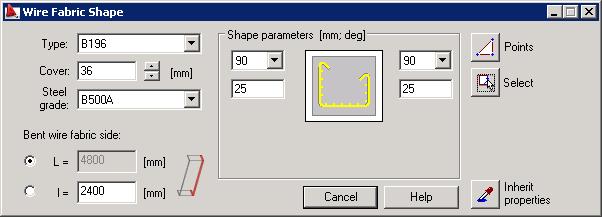
The Wire Fabric Shape dialog is be divided into three parts:
- The left-hand side of the dialog contains basic information about a wire fabric: wire fabric type, cover and reinforcing steel grade adopted from the settings in the preferences
- The center of the dialog provides options used to define the geometrical parameters of a wire fabric
- The right-hand side of the dialog includes icons that are used to select a mode of graphic definition of a wire fabric; Note: wire fabrics may be defined only after selecting these icons.
The dialog displays the last-defined type of a wire fabric and parameters adopted for it.
The icon  is used to assume parameters of the earlier-defined wire fabric.
To define a wire fabric in the cross section, it is necessary to specify the following parameters in the dialog:
- Wire fabric type (by default, the last type defined is adopted)
- Wire fabric cover (by default, the last cover defined is adopted)
- Reinforcing steel grade
- Bent wire fabric side - a longer (L-main direction) or a shorter (l) edge of the wire fabric panel will be bent
- In the Shape parameters field - parameters of the hook ending of a wire fabric, i.e. a hook angle and length (the hook length defined in the dialog box is a length of the straight segment of the hook).
The list of standard values (see: the method of measuring the angle of bar bending) of hook angles include:
- 0°
- 90°
- 135°
- 180°
- -90°
- -135°
- -180°.
While defining a wire fabric shape in the cross section, the following icons are available:
Points  - click to define the points that determine the wire fabric shape
Select  - click to select an object (line, polyline, arc, etc.) whose shape will determine the wire fabric shape.
Once definition of a reinforcement shape is complete, the Reinforcement description dialog, used to select elements of reinforcement description, displays.