There are a variety of different options that can be switched on or off within the Pattern Switches tab that influence how certain information is displayed. Other important settings can be switched on and off here. This section will give a brief explanation of each of them. To access the Pattern Switches:
To access Pattern Switches click File  Setup Database Fittings Pattern Switches or select the Database icon from the Utility Bar.
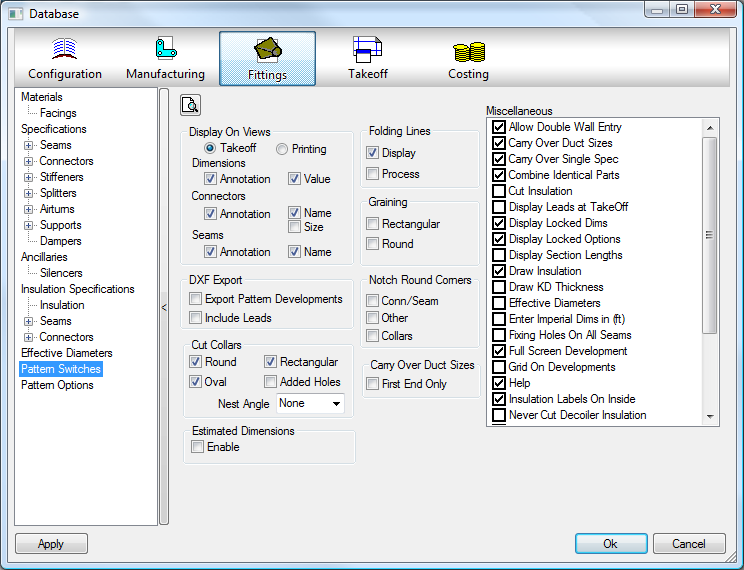
Display On Views
This option allows the user to set the amount of information that can be seen in the Pattern View window during Pattern Takeoff.
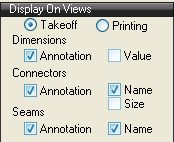
- TakeOff - Displays the settings that will be used when inputting fittings.
- Printing - Displays the settings that will be used when printing graphical views for the fittings.
- The Dimensions/Connectors/Seams information can all be set here.
- The Annotation option, if selected displays the annotation later in relation to the Dimension, Connector or Seam.
- The Value option displays the value of a dimension.
- The Name option displays the name of the Connector or Seam.
- The Size option will display the actual size of a connector, if applied.
DXF Export
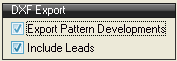
Export Pattern Development
Forces the exporting of all Pattern developments as they are accepted. Include Leads Includes the Lead-ins and Lead-outs in the exported Pattern / Cad Part development.
Cut Collars
This option allows the user to decide whether the software will cut collars or not.
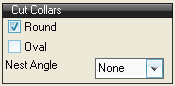
- Place a tick in either the Round or Oval options to produce the collars automatically.
- If a value is entered in the Nest Angle field, the collars will be forced to nest at the selected angle. If left that at None the collars will be nested at any angle.
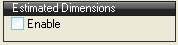
Estimated Dimensions
This option toggles On/Off the Estimated Dimensions options for use in the EST-Duct program. These options allow some of a patterns dimensions to be set as a percentage of the entered sizes - i.e. a Circular reducer could have only its largest end entered and the smaller end could be set to be 80% of that end.
Folding Lines
This option gives the user the chance to determine how the folding lines will be treated.
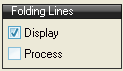
- Display toggles the displaying of the folding lines seen on folded or rolled fittings when developed.
- Process toggles whether folding lines are processed using an available marking tool. Note: If the Process option switch is selected and no marking tool is present the marking line may be traced by the cutting head. This may lead to large, unnecessary moves across the table.
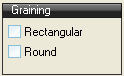
Graining
This option toggles Pattern Graining. If this option is set the Developments can only be rotated 180 degrees from the orientation in which they are displayed in the Takeoff development screen.
Notch Circular Corners
This option configures the way the corners on circular developments will be treated.
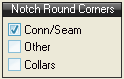
- The Conn /Seam field, if ticked, notches out all of the corners on circular fittings where a seam and connector meet.
- The Other option allows the notching of circular developments where two allowances that are not Connectors or Seams meet.
- The Collars field toggles the notching of circular collars where the Connector and Seam allowance meet.
Carry Over Duct Sizes
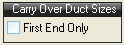
The First End Only option is used in conjunction with the Carry Over Duct Sizes option in the Miscellaneous options. When both options are on, the largest side of the duct is passed to the next fitting.
Estimated Dimensions
Toggles on/off the Estimated Dimensions options for use in the EST-Duct program. These options allow some of a pattern's dimensions to be set as a percentage of the entered sizes - e.g. a circular reducer could have only its largest end entered and the smaller end could be set to be 80% of that end.
Miscellaneous
The Miscellaneous section offers the user more configuration options.
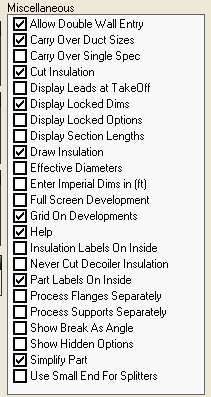
Allow Double Wall Entry
Toggles the Double Wall tick box on the Item Tab when in Takeoff. This then allows an Item to be made with Double Wall skins and Insulation. For more details refer to the Double Wall help file.
Carry Over Duct Sizes
Toggles whether the dimensions of an entered fitting are carried across to the next fitting. If a Reducing fitting is entered, the smallest end is carried through as the program assumes you are working from the largest end of the run down to the smallest. This is dependant on the First End Only option described above.
Carry Over Single Spec
If checked, will attempt to carry over the Specification across Pattern Libraries (as long as the item to receive is valid). Attempts to bridge across the Specification settings for Set Carry Over Values.
Cut Insulation
Toggles whether the Insulation material applied to fittings in a job is nested or not.
Display Leads at TakeOff
Toggles the displaying of the Leads on the pattern development when it is viewed during Takeoff.
Display Locked Dims
Toggles whether the locked dimensions of a customised fitting are displayed in normal Takeoff.
Display Locked Options
Toggles whether the locked options of a customised fitting are displayed in normal Takeoff.
Display Section Lengths
Display the lengths of the sections that form the part when viewing developments in Takeoff. In some cases this may lead to a very cluttered display, and it will be necessary to zoom in to be able to read the lengths. If consecutive lengths are the same, the program will display the length only once at a position averaged from the consecutive lengths. All lengths displayed are the lengths before any allowances or notches are applied.
Draw Insulation
Toggles the graphical representation of Insulation by creating a "skin", similar to what is seen in Double Wall, but without developing or manufacturing the skin for cutting.
Effective Diameters
Toggles whether the Effective Diameter table is used when calculating the finished sizes of Circular Ductwork.
Enter Imperial Dims in (ft)
Toggles the ability to enter Pattern Dims in feet rather than in Inches when using Imperial Dimensions. So 6" would be entered as 0.5 ft.
Full Screen Development
Toggles whether the development screen is displayed full screen or windowed by default.
Grid on Developments
Displays a measuring Grid when looking at the developments in the Takeoff screen.
Help
This switches on the built in Pattern Help (only available on some patterns), and will display an extra tab, called Help, when editing or adding the pattern to a job.
Insulation Labels on Inside
Similar to the Part Labels options but only affects the fittings that have been assigned an Insulation Material.
Never Cut Decoiler Insulation
When Cut Insulation is enabled, this switch determines whether insulation material for decoiled items should be nested.
Part Labels on Inside
When toggled on, the inside of the nested Fittings are facing up from the plate. When toggled off, the outside of the nested fittings are facing up from the plate.
Process Flanges Separately
Toggles whether an Estimate includes the calculated flange costs as part of the initial Takeoff or the flange costs are added separately as Free Entry Items.
Process Supports Separately
Show Break As Angle
Toggles whether the breaking information on the development views is shown as an Angle or as a Drop in MM / Inches.
Show Hidden Options
Toggles whether the Hidden Options for a fitting are displayed in normal Takeoff.
Simplify Part
Using this switch will attempt to reduce the number of lines used to develop and write the NC on the Part. Arcs can be made up of a number of small lines or if possible code for defining an Arc. This will reduce the size of the NC file and the amount of Data being sent to the controller.
Use Small End For Splitters
When toggled on, the small end of entered Ductwork is used to calculate the application of splitters.