You may need to contact Autodesk or your distributer for technical support. They may ask you to submit a support ticket and attach the relevant files to support your query.
Dependant on your application and the type of query raised, this can be done via a support zip, DWG or ESJ file. Please read the relevant procedure which explains how to backup the job for attaching to the Support ticket.
- How to save a job as an .esj or caj (archived file) Each user has their own unique database settings. Saving a job as an .esj file will save the job and a copy of the database settings, ie connectors allowances, seams, costing parameters etc.
- Within the program, go to File > Save Job As to prompt the Save Job As dialogue box.
- Use the Save as type drop down menu and change the file extension to Archived Job (*.ESJ).
- Name the file and click Ok.
-
How to create a self contained zip of your job and database/machine files
- Within the program, go to Help > Send Support email. The dialogue box Send Support email will appear.
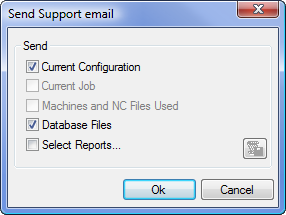
- Under Send, check that Current Configuration, Current Job, Machines and NC Files Used and Database Files tick boxes are all ticked. If the query relates to reports or labels, please additionally Select Reports and click the option to the right to select the reports in question.
- Click Ok. This prompts to save the zip in the location of your choice.
- This now can be attached with any other supporting information to a support ticket.
- Within the program, go to Help > Send Support email. The dialogue box Send Support email will appear.
-
How to send and attach A DWG drawing
- Save the drawing as a DWG file from the AutoCAD File menu.
- Clicking Save As will prompt for a new location.
- Attach the DWG and any other relevant information to the support ticket.