Autodesk InfraWorks 360 users can view cloud-published scenarios using the InfraWorks 360 web viewer. A scenario is a presentation package featuring all or part of a model. It can include snapshots, storyboards, watermarks, and points of interest.
- Using Manage Online Scenarios, design group members can open a scenario in the web viewer or invite others to view it by sending them an email invitation.
- Invited users can choose to view the scenario using the web viewer or the InfraWorks 360 iPad app.
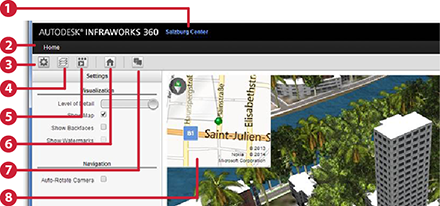
- Name of current scenario.
- List of scenarios you can view.
- Viewer settings panel.
- Turn display layers on or off.
- List of available storyboards for this model or scenario.
- Re-display Home Position.
- Comment on model or scenario using Design Feed.
- Map inset of area; toggle display from settings panel.